
What Is a CVE? A Plain-English Guide to Patching Your Software
TL;DR
- A CVE is a public ID for one known security flaw.
- PHP2Shell is two critical PHP flaws, CVE-2026-109618 and CVE-2026-109619, both scored 9.2.
- PHP below 8.2.35, 8.3.36, 8.4.27 and 8.5.12 is affected. Check yours.
- About 2 million servers still reported an affected version a day after the fixes, according to OX Security.
- To patch, back up, test on staging, update, then check.
What to do now
- Check your PHP version with the tool below.
- If it is below the fixed version, ask your host whether the fix is applied, or update.
- Follow the six patching steps and test before you go live.
Hosting with Click Click Media? Every hosted site has been patched, on every PHP version. A version check can still show an earlier number, which this section explains.
On 21 October 2026, the PHP project published advisories for two critical security flaws, nicknamed PHP2Shell. Each can let an attacker run their own code on a web server. PHP says updating is the only complete fix. W3Techs reports that PHP runs 69.3% of the websites whose server-side language is known, so your site probably uses it even if you have never heard of either flaw.
Both flaws have CVE numbers, which is how the security world tracks them. This guide covers what a CVE is, how to read one and how to patch without breaking your site, with PHP2Shell as the worked example.
Check Your PHP Version
PHP version checker
Check a website against the October 2026 PHP2Shell fixes
We read the site’s public response headers from our own server, then compare the PHP version it reports with the fixed versions. We don’t store the address you enter. Many hosts hide the PHP version, and if yours does we’ll say so.
Enter the full version, such as 8.3.12 or 8.4.26-2. Your host or developer can tell you.
This tool reads the version a server reports. Some Linux hosts apply security fixes without changing the version number, so a version that looks old may already be patched, and one that looks current may not be configured safely. Use the result as a prompt to ask your host. A security audit goes much deeper.
Enter your site’s address and the tool compares the PHP version it reports with the fixed versions. If your host hides the version, you can type it in yourself.
What is a CVE?
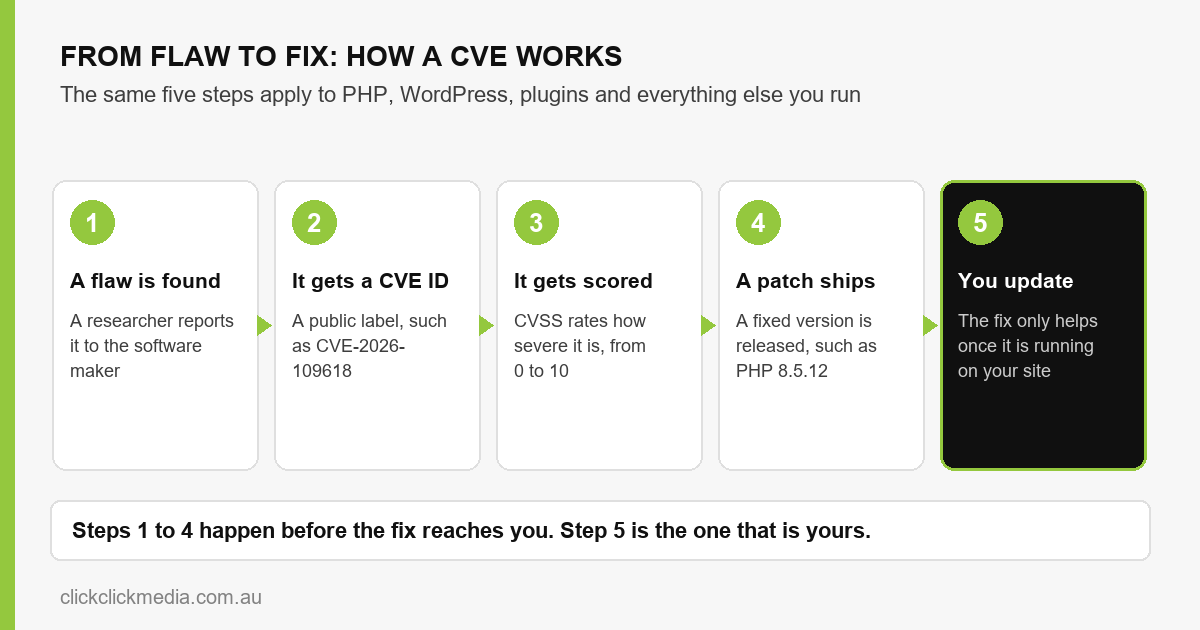
CVE stands for Common Vulnerabilities and Exposures. It is a public catalogue of known security flaws. Each one gets a unique ID made of the letters CVE, the year and a number, such as CVE-2026-109618. The program launched in 1999 and MITRE maintains it, while CVE Numbering Authorities, including many software makers, assign the IDs.
When a developer, a hosting company and a security researcher all mention CVE-2026-109618, they mean the same flaw. Without the ID, vendors would describe the same flaw in different words, which would make it much harder to check whether you are affected.
A CVE record is a label for a flaw that has been made public. The advisory that goes with it describes the flaw, the affected versions and the fix.
A CVE Record Gives You Five Facts
Each CVE links to an advisory with the details. The first PHP2Shell flaw breaks down like this.
| Part of the record | What it tells you | CVE-2026-109618 |
|---|---|---|
| CVE ID | The flaw’s public name | CVE-2026-109618 |
| Description | What is wrong and what an attacker could do | Remote code execution, triggered by a request that runs out of memory |
| CVSS score | How severe the flaw is | 9.2 out of 10, rated Critical |
| Affected versions | What is at risk | PHP below 8.2.35, 8.3.36, 8.4.27 and 8.5.12 |
| Patched versions | What fixes it | 8.2.35, 8.3.36, 8.4.27 and 8.5.12 |
The second flaw, CVE-2026-109619, has the same score and the same versions. PHP’s advisories for CVE-2026-109618 and CVE-2026-109619 give the full detail on each.
A CVSS Score of 9.0 or Above is Critical
The Common Vulnerability Scoring System, or CVSS, rates a flaw from 0 to 10. Under CVSS 4.0, 9.0 to 10.0 is Critical, 7.0 to 8.9 is High, 4.0 to 6.9 is Medium and 0.1 to 3.9 is Low. The score shows how severe a flaw is in the worst case, whatever setup it runs on.
| Rating | Score | How we treat it |
|---|---|---|
| Critical | 9.0 to 10.0 | Patch the same day, once a tested fix is ready |
| High | 7.0 to 8.9 | Patch within the same week |
| Medium | 4.0 to 6.9 | Schedule it into the next update window |
| Low | 0.1 to 3.9 | Include it in routine updates |
Both PHP2Shell flaws score 9.2 instead of a perfect 10, because the attacks need particular conditions to succeed.
PHP2Shell: Two Critical Flaws that Let Attackers Run Code
The first flaw, CVE-2026-109618, is about what PHP does when a request runs out of memory. In some situations memory is left in an invalid state. The advisory reports unauthenticated remote code execution in testing against mod_php with default limits. The second, CVE-2026-109619, is about leftover state from an earlier request that a crafted request can exploit.
Remote code execution means someone elsewhere on the internet can make your server run commands they wrote, such as altering pages, stealing data or attacking other sites from your server.
Both flaws are fixed in PHP 8.5.12, 8.4.27, 8.3.36 and 8.2.35. Every earlier version is listed as affected. The advisories mention interim measures, such as turning off session upload progress, but state that updating is the only reliable fix. How exposed a site is depends on how its server runs PHP, since the advisories treat mod_php, PHP-FPM, FrankenPHP and LSAPI differently, so ask your host which applies.
A Patched Server Can Still Show an Old Version
PHP numbers its own releases, such as 8.4.27, while Linux vendors that package PHP add a build number on the end. A version of 8.4.26-2 means PHP 8.4.26 rebuilt a second time by the vendor with the security fix added. A version check reads only the 8.4.26 part.
8.4.26PHP’s own release, without the fix8.4.26-2Vendor build: same PHP, fix addedA version check shows 8.4.26 for both.
Vendors patch this way because a new PHP release carries other bug fixes and changes as well as the security fix. Each would need testing across thousands of customer servers, since any of them could break a site. A security-only patch is a smaller change that can be released faster, which matters when attack tools are circulating. The approach also works for versions such as PHP 7.4 and 8.1, which will never get a new release number from PHP.
The version alone can’t tell you whether a server is protected. A server showing 8.4.26 might be unpatched, or it might be 8.4.26-2 with the fix. Ask your host whether the fix has been applied, or check the package version if you have access to the server.
How We Patched Our Own Servers
On 21 October we started patching the servers that host our clients’ sites. There were several, and each needed the update, a restart of PHP and a check of the version running afterwards.
The update was easy to apply and slow to repeat across every server. On some, the update tool reported nothing to install, so we checked the running version directly instead of relying on it.
Six Steps to Patch without Breaking Your Site
A patch is a newer version of the software, so the safest way to apply one is the same as for any update. These steps work for PHP, WordPress and plugins.
- Find out what you run. Ask your host or developer which PHP version your site uses. In WordPress, Tools, Site Health, Info and Server will show it.
- Compare it with the advisory. If your version is below the fixed version for its branch, the site needs the update.
- Take a backup you can restore. Keep it somewhere other than the server being updated, and check that it opens.
- Update a staging copy first. Plugins and themes can misbehave on a newer PHP version, and staging is where you find out without customers watching.
- Update the live site and test it. Restart PHP, confirm the version that is now running, then check your key pages, forms and checkout.
- Write down what changed. Record the old version, the new version and the date, so the next update starts from a known position.
If your host manages the server, it may handle PHP for you. Your CMS, plugins and themes usually remain your job, so check who owns each layer.
About 2 Million Servers Still Reported an Affected Version a Day After the Fixes
No one has published a definitive count, because each estimate measures something different. Treat every figure below as an estimate, dated 21 to 23 October 2026.
| What was measured | Figure | Source |
|---|---|---|
| Internet-facing PHP servers on affected versions, 24 hours after the fixes | About 1.97 million (about 1.99 million at first assessment) | OX Security, Shodan data, 22 Oct |
| Of those, showing a patched version after 24 hours | 14,151, so 99.28% still unpatched | OX Security |
| Hosts potentially vulnerable | Over 1.3 million, a rough estimate | Researcher Silas Cutler, quoted by Tenable |
| PHP sites on PHP 7.x or older | About 35% | W3Techs, 22 Oct (7.x 26.9%, 5.x 7.7%, 4.x 0.1%) |
| First exploitation attempt | 17 Oct, four days before disclosure, in a honeypot | Amazon Threat Intelligence |
| Exploitation observed | 21 Oct, against both flaws | watchTowr |
| On CISA’s exploited vulnerabilities list | Neither flaw, as of 23 Oct | CISA catalogue, latest release 21 Oct |
Tenable reports that PHP 7.4 to 8.1 have no official fixed release, only source backports. PHP 7.3 and earlier get nothing, so for those sites patching means upgrading to a supported version.
Every exposure count comes from version numbers that servers report publicly. Servers that hide their version aren’t counted, which pushes the real total up. Hosts that applied the fix without changing the number are counted as unpatched, which pushes it down. OX notes that Shodan’s index changes continuously, so a change in the totals isn’t proof of patching. Amazon says it is unclear whether its honeypot attempts would have succeeded against real systems. Tenable adds that code claiming to exploit the flaws is circulating, but none of it has been verified.
Attackers Can Read the Advisory Too
Once a CVE is public, anyone can read about the flaw. The advisory describes it and the patch shows what changed, so attackers can study both. Until your site installs the fix, it stays open to attack.
CISA keeps a public catalogue of exploited vulnerabilities. The Australian Cyber Security Centre lists patching among its Essential Eight strategies. Older software carries more risk. Our PHP version maintenance guide notes that PHP 8.2 stops receiving security patches at the end of 2026, so any flaw found after that date stays open.
Someone Needs to Own the Advisories
Security advisories are easy to miss, so someone needs to be responsible for reading them. Our website maintenance and security service in Sydney tracks advisories for WordPress, WooCommerce and major plugins. It targets security patches within hours of a public advisory, after testing on staging. If your site runs custom code, our PHP development team can check and upgrade the application itself.
Our advice is to patch critical flaws the day a tested fix exists, rather than waiting for a quarterly review. Hiding your PHP version is sensible hygiene, but it comes after patching.
Not sure what your site is running?
Our team can check your version against the PHP2Shell advisories and tell you what needs updating.
Talk to our maintenance teamFrequently Asked Questions
What does CVE stand for?
CVE stands for Common Vulnerabilities and Exposures. It is a public list of known security flaws, and each flaw has a unique ID such as CVE-2026-109618.
Does a CVE mean my website has been hacked?
No. A CVE labels a flaw that has been made public. Whether you are affected depends on the version you run, and an attack only succeeds if someone exploits the flaw.
What is a good CVSS score?
A lower score means a less serious flaw, and 9.0 or above is Critical. The score describes the flaw in general, so it doesn’t say whether your own setup is exposed.
How quickly should I patch a critical vulnerability?
As soon as a tested fix is available. For a Critical flaw in software that faces the internet, such as PHP, that means the same day. For a High flaw, within the week. Our website maintenance plans target security patches within hours of a public advisory.
Do I still need to patch if my host manages the server?
Possibly. A managed host often updates the server software, including PHP, but your CMS, plugins and themes usually remain your responsibility. Ask your host which PHP version your site now runs and who owns each of the other layers.
Related Reading