
The Best Cloudflare Setup for WordPress in 2026: The One We Actually Run

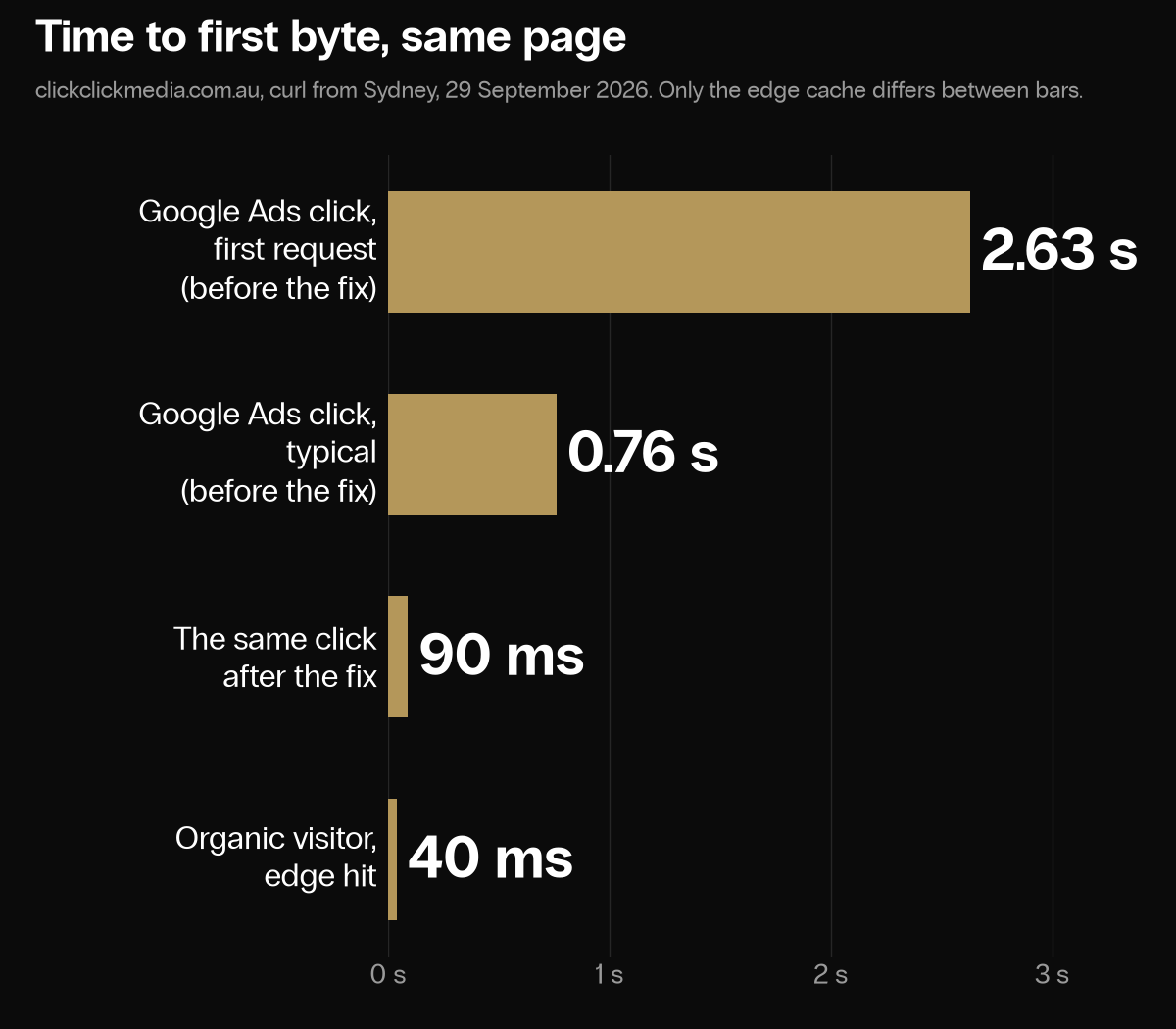
In September we found that our Google Ads landing pages were being cached separately from the clean pages, one copy per campaign, and never warmed. Those unwarmed copies went to the origin when first requested, in 0.76 and 2.63 seconds in the two cases we measured. After the fix the same campaign URLs came back from the edge in 90 to 120 milliseconds, and the clean page in about 40. The cause was two parameters Google now adds to every ad click that our setup did not list, plus one entry in the wrong case. The fix was four names added and one corrected, and it is the reason this guide exists.
This guide walks the Cloudflare dashboard page by page, in the order the settings matter, using the zone in front of clickclickmedia.com.au as the worked example. It is written for a site with forms and a small shop; the variants for membership sites and shops are one or two lines each and sit under rule 6 in step 1.
Pro or Free. Steps 1 to 4 work on both plans with one substitution: Free has no Snippets, so step 2 uses a Cache Rule setting instead. Free users who would rather not write rules can use APO, Cloudflare’s own WordPress page cache, described in step 12, and skip to step 3 to check it.
The essential path is steps 1 to 4 in order; step 4 ends with the conditions that tell you it worked. Steps 5 to 11 are refinements.
Implement this on your website with AI
Opens your assistant with this guide and seven questions it will ask you first: hostnames, plan, special pages. It then writes your rules, Snippet and checks with your details filled in.
Copy the prompt for Gemini, Grok or any assistant that cannot open a prefilled link. The prompt points at this page, which is also served as Markdown to assistants that ask for it.
Step 1. Caching, then Cache Rules
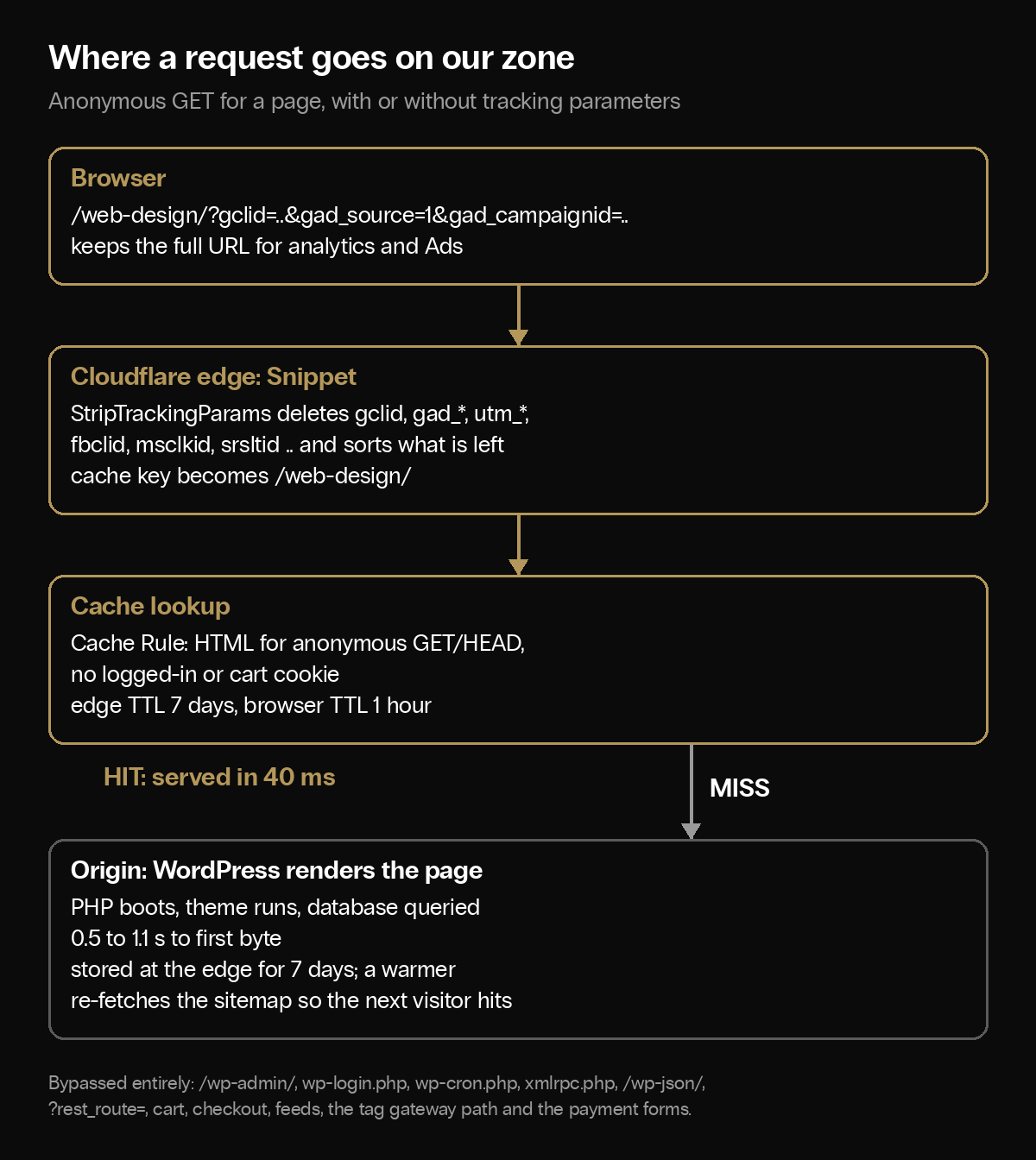
Uplift: by default Cloudflare caches images, CSS and JavaScript and sends every page request to the origin, where WordPress boots, runs the theme and queries the database: 0.5 to 1.1 seconds to first byte on our server. From the edge the same page takes 40 milliseconds. Nothing else in this guide is worth as much. Logged-in and bypassed requests still run on the origin, so a lean theme and sound WordPress development still decide how fast those pages load.
Cloudflare applies every matching Cache Rule in order, and when two rules set the same thing, the last one wins. That makes the order part of the configuration: rules that make things cacheable go first, and rules that keep things out of the cache go last, so nothing can re-enable them. Nine rules follow. Replace example.com with your hostnames throughout.
Rule 1. Cache Deception Armor. Create rule, name it, custom filter expression http.host in {"example.com" "www.example.com"}, tick Eligible for cache, and under Cache key turn on Cache Deception Armor. It refuses to cache a response whose file extension does not match its content type, with a caveat from Cloudflare’s own documentation: an origin Cache-Control header or an Edge TTL rule, which rule 2 is, may override the protection. Treat it as a backstop; the bypass rules below are the real protection. It goes first because the dashboard ticks eligibility with it and everything below must be able to override that.
Rule 2. Cache public pages. Custom filter expression, expression editor, paste:
(http.host in {"example.com" "www.example.com"}
 and http.request.method in {"GET" "HEAD" "PURGE"}
 and not (
   starts_with(http.request.uri.path, "/wp-admin/")
   or http.request.uri.path eq "/wp-login.php"
   or http.request.uri.path eq "/wp-cron.php"
   or http.request.uri.path eq "/xmlrpc.php"
   or starts_with(http.request.uri.path, "/wp-json/")
   or http.request.uri.query contains "rest_route="
 )
)
Then set: Cache eligibility, Eligible for cache. Edge TTL, Ignore cache-control header and use this TTL, with status code TTLs of 7 days for 200, 5 minutes for 404, and No cache for 301 and 302. Browser TTL, Respect origin.
Three notes on rule 2:
- PURGE is in the method list on purpose. Cloudflare’s single-URL purge uses an internal PURGE method, and its documentation warns that a rule matching only GET may prevent a purge from matching. Leave PURGE in.
- Browser TTL, respect origin. Our origin sends
Cache-Control: public, max-age=3600, stale-while-revalidate=86400: an hour in the browser, a week at the edge. The edge can be purged in seconds; a browser cannot. A one-year browser TTL on HTML means a bad page can sit in a returning visitor’s browser for a year. - It caches more than HTML. Anything public on a matching path that is not excluded below is stored, including sitemaps and robots.txt, which is fine as long as you purge them when they change. Because the Edge TTL overrides the origin, a
no-storefrom WordPress does not protect a request this rule admits; that is what the bypass rules are for.
Rule 3. Static assets. Eligible; Edge TTL and Browser TTL one year. http.request.uri.path.extension in {"css" "js" "jpg" "jpeg" "png" "gif" "webp" "avif" "svg" "ico" "woff" "woff2" "ttf" "otf" "mp4" "pdf"}. WordPress versions its scripts and styles with a ?ver= query string, and under these rules the query string stays in the cache key, so a new version is a new object. Keep it that way; the Free-plan note in step 2 explains the one setting that would break it.
Rule 4. Uploads and image transformations. Eligible; one year. starts_with(http.request.uri.path, "/wp-content/uploads/") or starts_with(http.request.uri.path, "/cdn-cgi/image/").
Rule 5. Bypass WordPress’s own endpoints and non-page methods. Bypass cache, Browser TTL bypass.
(starts_with(http.request.uri.path, "/wp-admin/")
 or http.request.uri.path eq "/wp-login.php"
 or http.request.uri.path eq "/wp-cron.php"
 or http.request.uri.path eq "/xmlrpc.php"
 or starts_with(http.request.uri.path, "/wp-json/")
 or http.request.uri.query contains "rest_route="
 or not (http.request.method in {"GET" "HEAD" "PURGE"}))
Rule 6. Bypass logged-in users, carts and password-protected posts. Bypass cache.
(http.cookie contains "wordpress_logged_in"
 or http.cookie contains "wp-postpass_"
 or http.cookie contains "woocommerce_items_in_cart"
 or http.cookie contains "wp_woocommerce_session_"
 or http.request.uri.path contains "/cart"
 or http.request.uri.path contains "/checkout"
 or http.request.uri.path contains "/my-account")
Do not add a generic PHP session cookie such as PHPSESSID here unless your site personalises public pages by it. WordPress plugins start PHP sessions freely, on our site the admin-ajax endpoint that the homepage calls sets one on every response, and a bypass on that cookie sends every visitor who has loaded one page to the origin for the rest of their visit; we made that mistake for about an hour. This is the rule that keeps logged-in users on the origin. It has to come after rules 1 and 2: with the order reversed, a logged-in request is made eligible by rule 1, the lookup finds the anonymous copy, and the editor is served the public page. We found that on our own zone by sending a request with a fake login cookie and getting a cache hit.
Variants for other kinds of site, added to the same rule:
- Membership sites and logged-in readers. Members who sign in with WordPress accounts are already covered by the first line. Add the members’ area so nothing there is ever stored:
or starts_with(http.request.uri.path, "/members/"), with your own path. If the plugin sets its own login cookie instead of WordPress’s, addor http.cookie contains "its-cookie-name". - Shops. The WooCommerce lines above cover carts, sessions and account pages. A shop that shows different prices to logged-in customer roles is covered by the first line; if it varies prices for anonymous visitors by location or currency, add those pages to rule 5 or do not cache them.
- Pages that change for anonymous visitors. Geo-targeted content, A/B tests and anything set by a cookie on the first visit: with the Edge TTL overridden, Cloudflare strips
Set-Cookiefrom the response and caches the first version for everyone. Add those paths to rule 5, or check what your site sends to a cookieless visitor before caching it.
Rule 7. Bypass feeds. Bypass cache. ends_with(http.request.uri.path, "/feed/") or http.request.uri.path contains "/feed/" or http.request.uri.query contains "feed=".
Rule 8. Bypass the tag gateway path (step 9). Bypass cache. starts_with(http.request.uri.path, "/pk3w"); your path will differ.
Rule 9. Bypass payment and quote forms. Bypass cache. starts_with(http.request.uri.path, "/quote/") or starts_with(http.request.uri.path, "/pay/"), one clause per page. Match the path, not the full URL, or /quote/?ref=partner slips through.
Search results are cached by this set: /?s=seo gets its own seven-day copy per term. If you would rather they were not, add starts_with(http.request.uri.query, "s=") or http.request.uri.query contains "&s=" to rule 5.
Step 2. Rules, then Snippets
Cloudflare’s cache key is the whole URL, query string included. /web-design/ and /web-design/?gclid=abc are two objects. Google’s help page says every ad URL carries gad_source, shared by an ad source, and gad_campaignid, shared by a campaign, on top of the per-click gclid. A setup that strips only gclid therefore keeps one copy per campaign per landing page, separate from the clean page and never warmed. That was ours.
2a. Create the Snippet. Select Create Snippet, name it StripTrackingParams, and paste:
export default {
  async fetch(request) {
    const url = new URL(request.url);
    if (!url.search) return fetch(request);

    const TRACKING_PARAMS = new Set([
      'utm_source', 'utm_medium', 'utm_campaign', 'utm_term', 'utm_content', 'utm_id',
      'gclid', 'gclsrc', 'gbraid', 'wbraid', 'dclid',
      'gad_source', 'gad_campaignid', 'srsltid',
      'fbclid', 'fb_action_ids', 'fb_action_types', 'fb_source',
      'msclkid', 'ttclid', 'twclid', 'li_fat_id', 'rdt_cid', 'epik',
      'sc_cid', 's_kwcid', 'ef_id', 'mkt_tok', 'vero_id',
      'oly_enc_id', 'oly_anon_id', '_kx',
      'mc_eid', 'mc_cid', '_ga', '_gl',
      '_hsenc', '_hsmi', 'hsctatracking',
      '_bta_tid', '_bta_c', 'igshid', 'yclid', 'zanpid'
    ]);

    const keysToDelete = [];
    for (const key of url.searchParams.keys()) {
      if (TRACKING_PARAMS.has(key.toLowerCase())) keysToDelete.push(key);
    }
    if (keysToDelete.length === 0) return fetch(request);

    for (const key of keysToDelete) url.searchParams.delete(key);
    return fetch(new Request(url.toString(), request));
  }
};
The Snippet only rewrites a request when it removed at least one listed parameter; a URL with no tracking parameters passes through untouched. When it does rewrite, the remaining parameters are re-encoded (a %20 becomes a +), which is why the rule below keeps it away from payment, quote and signed routes.
2b. Set the snippet rule to custom filter expression, so it runs on anonymous public pages of your own hostnames only. Cache bypass and Snippet execution are separate decisions, so the exclusions are repeated here:
(http.host in {"example.com" "www.example.com"}
 and http.request.method in {"GET" "HEAD"}
 and not http.request.uri.path.extension in {"css" "js" "jpg" "jpeg" "png" "gif" "webp" "avif" "svg" "ico" "woff" "woff2" "ttf" "otf" "mp4" "mp3" "pdf" "json" "xml" "txt" "zip"}
 and not starts_with(http.request.uri.path, "/wp-admin/")
 and not http.request.uri.path eq "/wp-login.php"
 and not starts_with(http.request.uri.path, "/wp-json/")
 and not http.request.uri.query contains "rest_route="
 and not http.request.uri.path contains "/cart"
 and not http.request.uri.path contains "/checkout"
 and not http.request.uri.path contains "/my-account"
 and not starts_with(http.request.uri.path, "/quote/")
 and not starts_with(http.request.uri.path, "/pay/")
 and not starts_with(http.request.uri.path, "/pk3w")
 and not http.cookie contains "wordpress_logged_in"
 and not http.cookie contains "wp-postpass_"
 and not http.cookie contains "woocommerce_items_in_cart"
 and not http.cookie contains "wp_woocommerce_session_")
Add any signed or tokenised route of your own to the path exclusions; the Snippet cannot recognise those by itself.
Deploy. What changes:
- The browser keeps the full URL. The Google tag, the Meta pixel and the tag gateway all read the click ID in the browser and see every parameter as before.
- The cache, and on a miss the origin, see the stripped URL. Server-side code that reads
gclidfrom the request stops seeing it. If a plugin captures click IDs on the server, move that capture into the browser first, and test that the values reach the submitted lead. We verified that the tag gateway kept receiving click IDs; whether they reach your CRM depends on how your forms capture them. - Keep the list lowercase. The code lowercases the incoming key before checking; a mixed-case entry never matches.
- The list goes stale. Every list written before Google added
gad_sourceandgad_campaignidmisses both. Re-run step 3 every quarter.
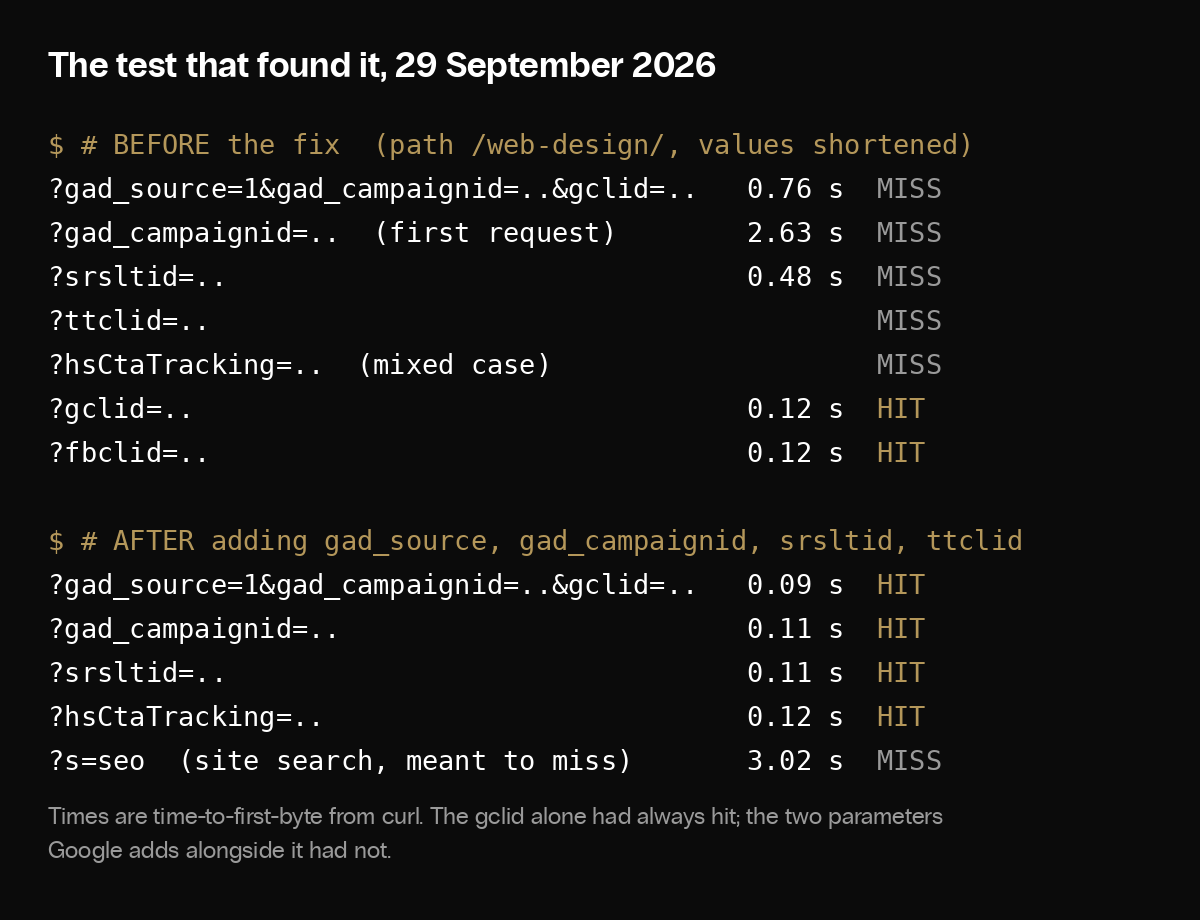
What the fix did, same page, same Sydney connection, 29 September 2026, one request per shape:
| Shape | Before | After |
|---|---|---|
?gclid=… | HIT 0.12 s | HIT 0.12 s |
?gad_source=1&gad_campaignid=…&gclid=… | MISS 0.76 s | HIT 0.09 s |
?gad_campaignid=… (first request) | MISS 2.63 s | HIT 0.11 s |
?srsltid=… | MISS 0.48 s | HIT 0.11 s |
?hsCtaTracking=… | MISS | HIT 0.12 s |
?fbclid=… | HIT 0.12 s | HIT 0.12 s |
?s=seo (site search) | MISS 3.02 s | MISS |
On the Free plan there are no Snippets, and the substitute needs care. Do not put Query string: Ignore on rule 2; it would also apply to your scripts and styles, and WordPress’s ?ver= versioning would stop producing new objects at the edge. Instead add a rule between 4 and 5, “Ignore query strings on public pages”: Cache key, Query string, Ignore, with the expression
(http.host in {"example.com" "www.example.com"}
 and http.request.method in {"GET" "HEAD" "PURGE"}
 and not http.request.uri.path.extension in {"css" "js" "jpg" "jpeg" "png" "gif" "webp" "avif" "svg" "ico" "woff" "woff2" "ttf" "otf" "mp4" "pdf"}
 and not starts_with(http.request.uri.query, "s=")
 and not http.request.uri.query contains "&s="
 and not http.request.uri.query contains "preview="
 and not http.request.uri.query contains "paged=")
Every other parameter on those pages then maps to the clean copy, functional ones included, so add each parameter your plugins or WooCommerce use to the exclusions. If that list is uncertain, use APO instead (step 12). The lists that would let you name the parameters directly are Enterprise only.
Step 3. Check the cache with curl on Windows or Mac
Cloudflare adds a cf-cache-status header to responses that went through its cache logic. Reading it needs curl, which your computer already has.
- Mac: Terminal, under Applications then Utilities.
- Windows 10 or 11: in the PowerShell that ships with Windows, type
curl.exewith the.exe, because the bare wordcurlthere is an alias for a different command. In PowerShell 7 and in Command Prompt the barecurlis the real one;curl.exeworks everywhere.
3a. Read the headers of one page. Replace the address with your own.
Mac:
curl -sI https://example.com/some-page/ | grep -i -E "cf-cache-status|^age|cache-control|cf-ray"Windows:
curl.exe -sI https://example.com/some-page/ | findstr /i "cf-cache-status age: cache-control cf-ray"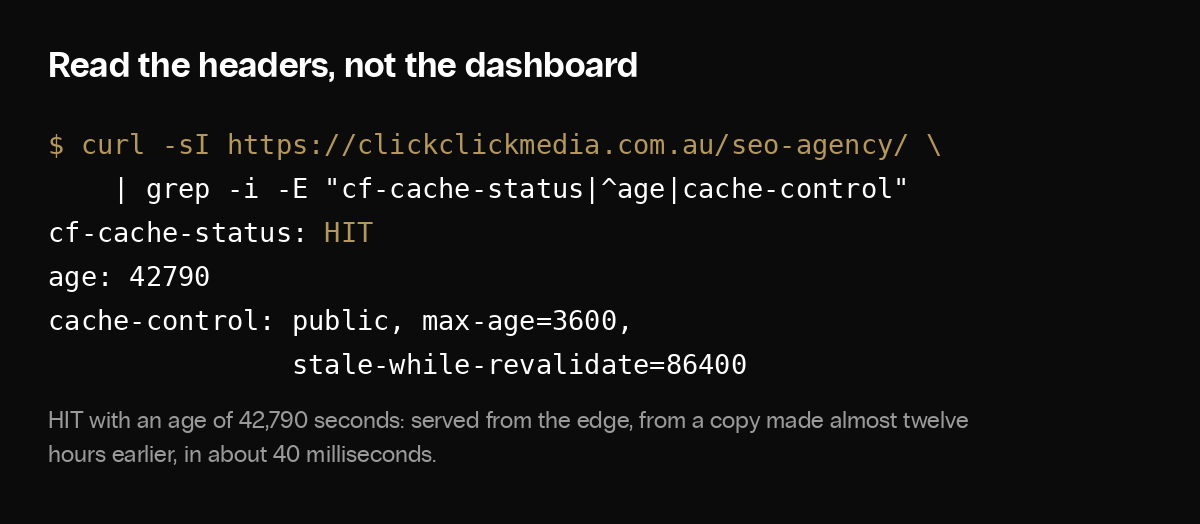
What comes back:
cf-rayends in a three-letter airport code: the Cloudflare data centre that answered. From Sydney it says SYD.cf-cache-statusis the verdict, below.ageis how many seconds ago the copy was stored. Cloudflare does not add it on aMISS; on aHITunder Tiered Cache it can be the upper tier’s age.cache-controlis the instruction your browser will follow.- Header names are case-insensitive; some builds of curl print them capitalised. No header at all usually means a redirect, a challenge page or a Worker answered instead of the cache; request the final URL.
The verdicts:
HIT: served from the edge. With anagein the thousands, caching is working.MISS: eligible but not stored yet; the origin served it and the copy is now stored. Run it again and expectHIT. That pair is the signature of a working rule.DYNAMIC: not treated as cacheable. The default for HTML when no rule matches, and also what a bypass rule produces, so on your homepage it means either rule 2 is not reaching it or a later bypass is; check which rule matched rather than guessing. On your login page it is correct.BYPASS: a rule made it eligible but the origin’s response was not cacheable, usually aSet-Cookieorno-storeon a rule without an Edge TTL override.EXPIRED,REVALIDATED,UPDATING: the copy was past its time and the origin was, or is being, asked for a fresh one.STALE: the copy was past its time and the origin could not be reached, so the old copy was served. One is fine; a run of them means an origin problem.
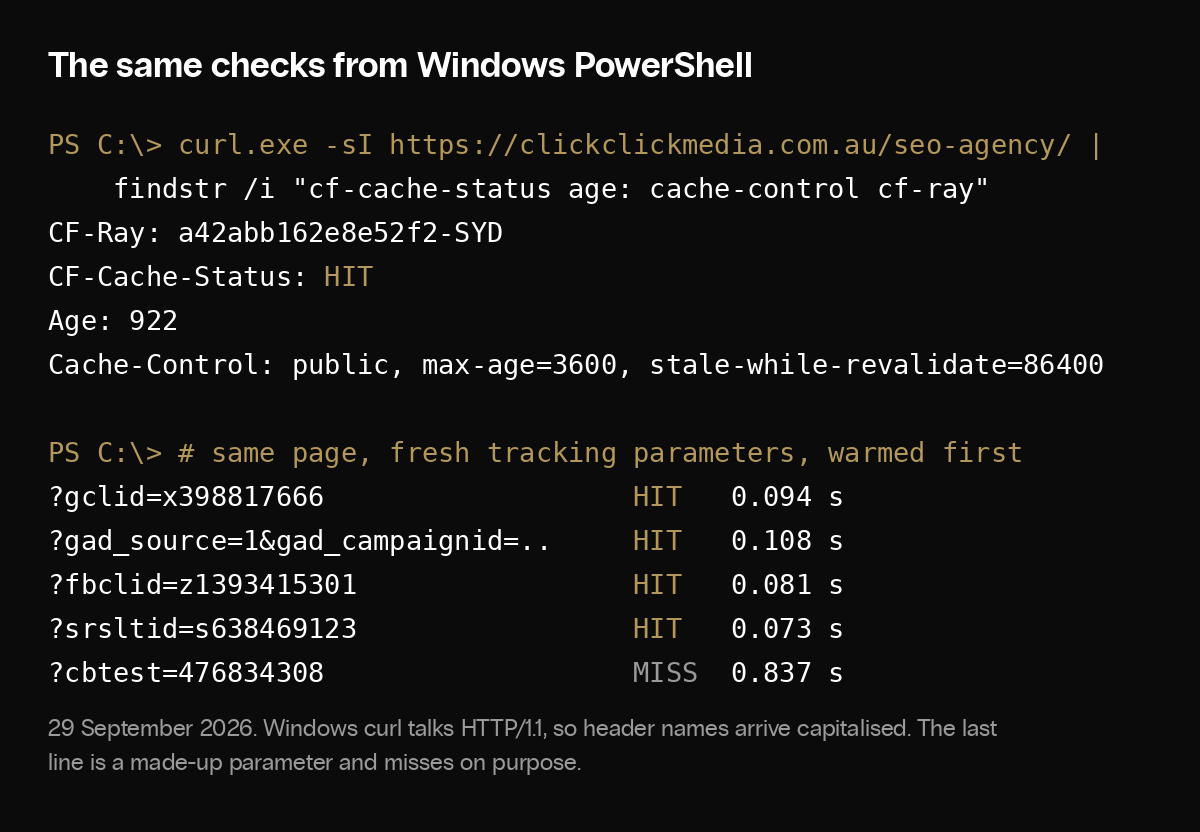
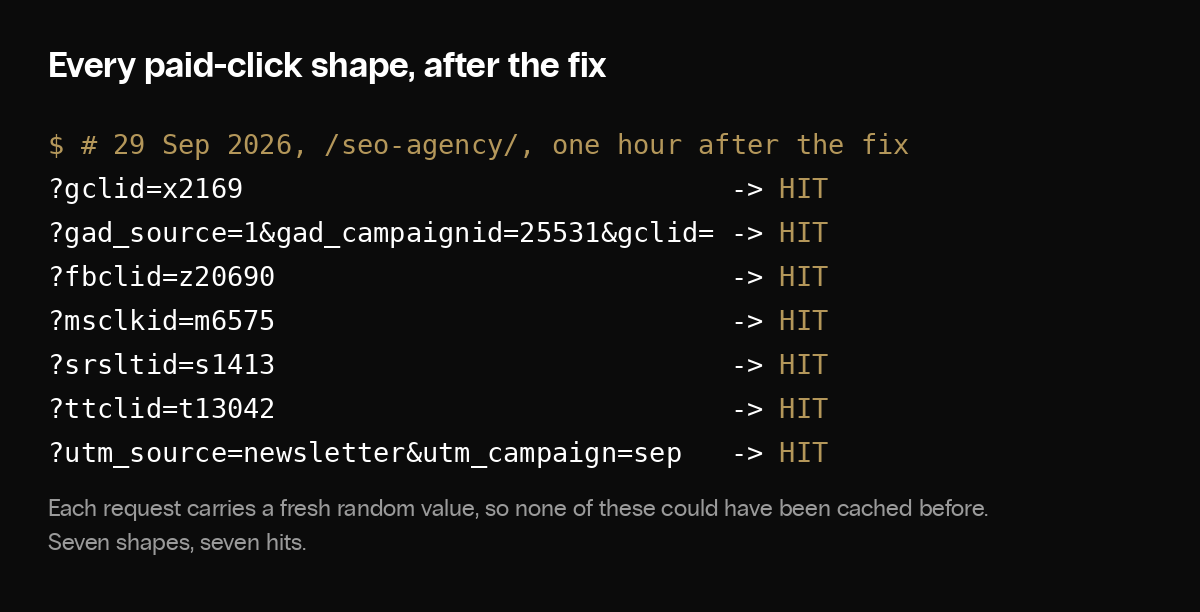
3b. The paid-click test. Request the plain page until you have seen a 200 and a HIT, then request it with a fresh random value on each tracking parameter your campaigns use. Each line prints the HTTP status, the verdict and the time separately; piping curl’s timing through a filter discards the time.
Mac:
url="https://example.com/some-page/"
curl -s -o /dev/null -w 'plain page: %{http_code}\n' "$url"
curl -sI "$url" | grep -i cf-cache-status
for q in "gclid=x$RANDOM" "gad_source=1&gad_campaignid=$RANDOM&gclid=y$RANDOM" \
         "fbclid=z$RANDOM" "msclkid=m$RANDOM" "srsltid=s$RANDOM" "ttclid=t$RANDOM" \
         "utm_source=newsletter&utm_campaign=c$RANDOM"; do
  r=$(curl -s -o /dev/null -w '%{http_code} %{time_starttransfer}' -D /tmp/h "$url?$q")
  printf '%-60s %-24s %s\n' "?$q" "$(grep -i -o 'cf-cache-status: [A-Z]*' /tmp/h)" "$r"
done
Windows PowerShell:
$url = "https://example.com/some-page/"
curl.exe -s -o NUL -w "plain page: %{http_code}`n" $url
curl.exe -sI $url | findstr /i cf-cache-status
foreach ($q in "gclid=x$(Get-Random)", "gad_source=1&gad_campaignid=$(Get-Random)&gclid=y$(Get-Random)",
               "fbclid=z$(Get-Random)", "msclkid=m$(Get-Random)", "srsltid=s$(Get-Random)", "ttclid=t$(Get-Random)",
               "utm_source=newsletter&utm_campaign=c$(Get-Random)") {
  $r = curl.exe -s -o NUL -w "%{http_code} %{time_starttransfer}" -D "$env:TEMP\h.txt" "${url}?$q"
  $s = (Select-String -Path "$env:TEMP\h.txt" -Pattern "cf-cache-status: \w+").Matches.Value
  "{0,-60} {1,-24} {2}" -f "?$q", $s, $r
}- The plain page should say 200 and
HITbefore you start. If it says 301 or 302, use the address it redirects to. - Every shape should say 200 and
HITon its first request. Because the clean URL was warm, aMISSmeans that shape did not collapse to the clean key; the usual cause is a parameter your Snippet does not list. Repeating the same tagged URL proves nothing, since its own copy is now warm; test again with a fresh value. - The time is a separate reading. From a nearby edge expect around a tenth of a second; ours were 90 to 120 milliseconds. From the other side of the world it will be more. Compare your times against each other.
- Run it a few times. A single request is a sighting, not a benchmark.
3c. The paths that must not cache. Run 3a against your feed URL, your login page, /wp-json/wp/v2/posts, /?rest_route=/wp/v2/posts and a quote or payment page with a query string. Each should return DYNAMIC or BYPASS twice in a row. MISS then HIT means a later rule is overriding a bypass; check the order in step 1. Then test rule 6 with a real session: in a browser where you are logged in, open Developer Tools, Network, reload a public page and select the document request. It should show DYNAMIC or BYPASS every time and the page should carry the admin bar. In a private window the same page should show HIT and no admin bar. The bar alone proves nothing, because a wrongly cached logged-in page would carry it too; the header and the anonymous comparison are the proof.
Three things that mislead:
- curl carries no cookies, so it sees your site as an anonymous visitor does. In a browser use a private window; a logged-in session is bypassed by design and shows
DYNAMICorBYPASSeverywhere. The browser route is Developer Tools, Network, then the page request’s response headers. - A
?cb=123cache-buster forces a miss only while the query string is part of the cache key. Under the Free-plan Ignore setting it does not, and reusing the same value can hit an earlier copy. Test the plain URL and read theage. - A 404 is cached too, for five minutes under rule 2, so a page published a moment ago can 404 briefly to anyone who requested it too early.
Step 4. Caching, then Configuration, and your WordPress plugin
On the Configuration page: Caching Level, Standard (the API calls it aggressive); with Cache Rules doing the real work it rarely matters. Browser Cache TTL, Respect Existing Headers, so the number is set at the origin. Always Online, On: it serves an Internet Archive copy when the origin is unreachable (a 520 to 527), not when it returns its own 500; Pro crawls every 15 days, Free every 30. Purge Cache lives on the same page for manual purges.
A seven-day edge TTL is only safe because a publish or edit purges the page, and something warms it afterwards. Both are WordPress-side:
- Purge on publish. Install Cloudflare’s own WordPress plugin, connect it with an API token, and turn on Automatic Cache Management. It purges a post’s URL, its archives and attachments when a post is published, edited or deleted. It runs on post saves, so a change made outside the post editor, a widget, a menu, a theme option, needs a manual purge from the Configuration page.
- Test it, once. Change something visible on a page, publish, then open the plain URL in a private window and confirm the new text is there. Headers alone cannot show that; the plugin’s success message and a cache
HITare not proof of freshness either. The body is. - Warm periodically. After a purge the first visitor to that page pays the origin cost unless something fetches it first. A scheduled fetch of every URL in your sitemap keeps the site warm between publishes; a page purged between runs is cold until the next run or its first visitor. On a server with cron, once an hour:
curl -s https://example.com/post-sitemap.xml https://example.com/page-sitemap.xml \
  | grep -o '<loc>[^<]*' | sed 's/<loc>//' \
  | xargs -n 1 -P 4 curl -s -o /dev/null
Use your sitemap file names; a sitemap index lists them. Skip pages that bypass on purpose.
- A purge is not done when the file is gone from the server. A deleted file stays in the edge cache until it is purged. Delete, purge, fetch again, confirm the 404. Never leave a
.bakfile in a served directory.
You are done with the essential path when:
- a public page returns
MISSthenHIT, and campaign-tagged versions of it returnHIT(3b); - the login page, feeds, REST routes and form pages return
DYNAMICorBYPASS(3c); - a logged-in document request shows
DYNAMICorBYPASSwith the admin bar, and a private window showsHITwithout it; - a change you publish appears at the plain URL within a minute.
Step 5. Caching, then Tiered Cache and Cache Reserve; Traffic, then Argo
Cloudflare now packages these three as Smart Shield; the settings are the same.
- Tiered Cache, Smart Tiered Cache Topology: on. Every plan, no cost. Without it each Cloudflare data centre asks your origin independently, so a warm cache in Sydney does nothing for a visitor in Perth or a Googlebot request from the United States. With it, the other data centres ask one upper tier near your origin first.
- Cache Reserve: on, as a paid add-on. It is a separate subscription, not part of a Pro zone: US$0.015 per gigabyte a month, US$4.50 per million writes and US$0.36 per million reads, operations billed in whole millions. A persistent store behind the edge, so the long tail stays warm instead of being evicted. Content needs a TTL of ten hours or more and a
Content-Lengthheader. HTML rendered by PHP usually has noContent-Length, ours included, so Reserve holds your images and static files, not your pages. Check with 3a on a MISS. Resized image variants are not eligible either. - Argo Smart Routing: last. Under Traffic. A paid add-on on every plan that routes around congestion between the edge and the origin. It helps distant visitors on uncached requests; with cached HTML and local visitors it is the one to leave for last.
Step 6. Speed, then Settings
Three tabs: Content Optimization, Image Optimization, Protocol Optimization. Every toggle, what ours is set to, and the verdict:
| Setting | Ours | Verdict |
|---|---|---|
| Brotli | On | Leave on |
| Early Hints | Off | Try it |
| Rocket Loader | Off | Leave off |
| Speed Brain | Off | Try it |
| Prefetch Preload | Off | Leave off |
| Auto Minify | Gone | Removed 2024 |
| Polish | Lossy, WebP | On, Pro+ |
| Mirage | Gone | Removed 2025 |
| HTTP/2, HTTP/3 | On | Leave on |
| 0-RTT | On | Leave on |
The ones that need a sentence:
- Early Hints. Turns your Link preload headers into 103 responses; Cloudflare’s tests showed over 30% faster LCP on first visits. Worth trying if your theme sends Link preload headers; the gain is smaller when the HTML already arrives from the edge in 40 milliseconds.
- Rocket Loader. Defers every script until after render, which breaks jQuery-dependent WordPress themes. Cloudflare’s own documentation says to turn it off if you see JavaScript issues. Defer in the theme instead.
- Speed Brain. Free on every plan, on by default on Free. Sends a Speculation-Rules header so the browser prefetches the next page when a visitor presses a link, if that page is already in the edge cache. Helps second pages, never the first.
- Auto Minify and Mirage. Gone: Auto Minify in August 2024 after Cloudflare measured under 0.1% page-size reduction, Mirage on 15 September 2025. A guide that tells you to turn either on is out of date.
- Polish. Pro and above. Recompresses images served from your origin and can serve WebP. Images from Cloudflare’s own image service are already optimised.
- 0-RTT. Resumes a returning visitor’s connection with no round trip. Cloudflare only answers GET requests with no query string over 0-RTT, to prevent replay attacks, and adds an
Early-Data: 1header so the origin can tell.
Step 7. SSL/TLS
- Overview, encryption mode: Full (strict). Flexible talks to your origin over plain HTTP; Full accepts any certificate, even self-signed; Full (strict) requires a valid certificate on the origin. Install one first.
- Edge Certificates, TLS 1.3: on. Minimum TLS Version: 1.2.
- Edge Certificates, HSTS: enable, staged. Tells browsers never to try HTTP again. Start with a short max-age and without subdomains or preload, because it cannot be undone quickly; raise it once nothing breaks.
Step 8. Security
8a. Security rules, Managed rules. Every plan gets the Free Managed Ruleset; Pro adds the Cloudflare Managed Ruleset and the OWASP Core Ruleset. Deploy the Cloudflare Managed Ruleset. Leaked credentials detection is a separate feature that replaces the deprecated Exposed Credentials Check: Free checks submitted passwords against leaked sets by default; on Pro and above you switch the detection on and it also checks username and password pairs. Either only flags the request until you add a custom or rate limiting rule that acts on the flag. When a rule blocks something legitimate, usually a long form with a file upload, find the rule ID in the security events log and skip that rule on that path only. A page-wide skip of the WAF, rate limiting and bot protection, the usual quick fix, removes far more protection than one false positive justifies.
8b. Security rules, Rate limiting rules. Included on every plan: one rule on Free with a ten-second window, two on Pro with windows up to a minute and blocks up to an hour. Create rule, Rate limiting rules; expression http.request.uri.path eq "/wp-login.php"; characteristics, IP. Starting thresholds: more than 5 requests in 10 seconds from one address on Free, blocked for 10 seconds; more than 10 in a minute on Pro, blocked for 10 minutes. A person logging in makes two or three; an office behind one public address shares the count, so raise the limit if your team logs in together. Without a rule, in the fortnight to 28 September 1,817 requests pretending to be Googlebot reached our login page from three addresses.
8c. Settings. The bot, scraping and integrity switches live on one page:
| Setting | Ours | Verdict |
|---|---|---|
| Super Bot Fight Mode: definitely automated | Allow | See below |
| Super Bot Fight Mode: likely automated | Allow | See below |
| Super Bot Fight Mode: verified bots | Allow | Leave allowed |
| Static resource protection | Off | Leave off |
| Optimize for WordPress | On | Turn on |
| JavaScript detections | Off | Leave off |
| Browser Integrity Check | On | Leave on |
| Hotlink Protection | Off | Off for most sites |
| Email Address Obfuscation | Off | Leave off |
| Security Level | Automated | Nothing to set |
- Super Bot Fight Mode. The usual advice is block the definitely automated, challenge the likely automated, allow verified bots. Ours allows all three, because the automated categories catch rank trackers, uptime monitors, link checkers and AI agents, and blocking them means the tools our clients use to look at our site fail. What still runs is the managed rules, DDoS protection and the origin logs, which is where the 1,817 login requests above were counted. A shop or a login-heavy site should challenge the first category.
- Optimize for WordPress. Stops bot detection blocking the loopback requests WordPress makes to itself; without it Site Health reports errors and scheduled tasks can fail.
- Browser Integrity Check. Refuses requests with headers spammers use and challenges visitors with no user agent.
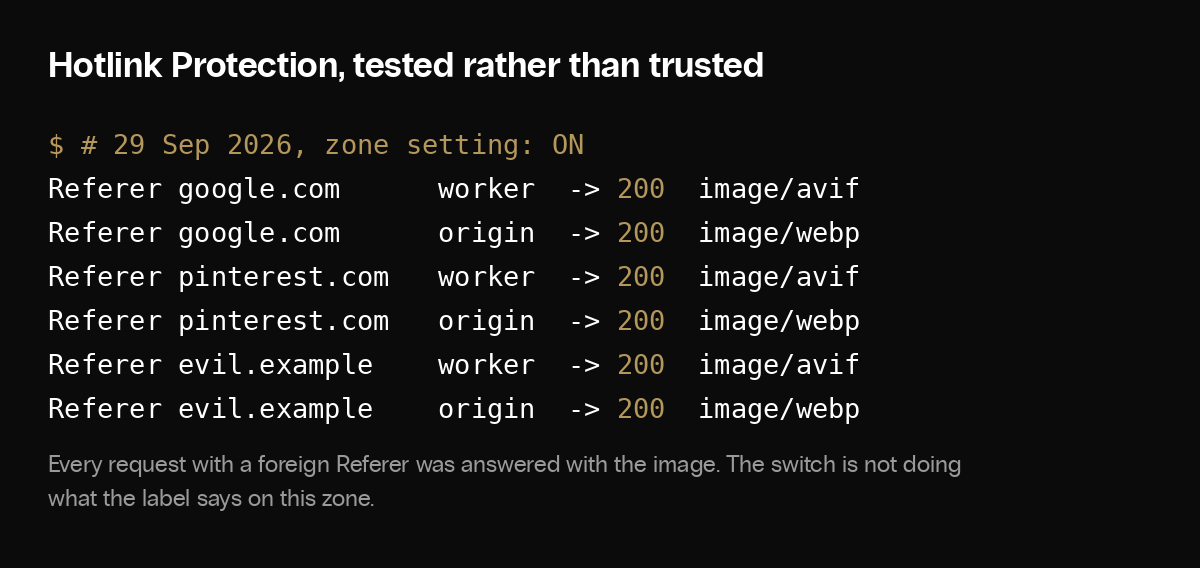
- Hotlink Protection. Cloudflare’s documentation says it also stops your images showing on Google Images, Pinterest and Facebook. If image search sends you customers, leave it off; the
hotlink-okdirectory is the exemption otherwise. Tested on our zone while it was still on, requests carrying a Google, Pinterest or made-up referer all returned 200 from the images subdomain and the origin path: it blocked nothing measurable, and when it does work it blocks image search. Ours is now off. - Email Address Obfuscation. Adds a script to every page.
- Security Level. The slider is gone. Since March 2025 it is “Always protected”, Cloudflare sets the threshold, and rules built on the old IP threat score are retired by the end of March 2026.
8d. AI crawlers, under AI in the sidebar. Being found by AI search and letting your content train models are separate decisions with separate controls, and the controls differ by company:
- OpenAI: a site can allow OAI-SearchBot, which puts pages into ChatGPT search, while disallowing GPTBot, which collects training data; OpenAI says each setting is independent.
- Google: Google-Extended is not a crawler but a token in robots.txt. It controls whether your pages train Gemini and whether they are used for grounding in the Gemini apps and Vertex AI. It has no effect on Google Search, its ranking, or its AI features, which use Googlebot.
- Cloudflare’s managed robots.txt, which prepended
Disallow: /for GPTBot, ClaudeBot, Google-Extended, CCBot, Bytespider, Amazonbot, Applebot-Extended and meta-externalagent plus a Content-Signal line, is being succeeded by Bot Preference Sync (announced 21 August 2026, reaching existing zones through September, documentation still catching up). It writes robots.txt entries from three dashboard choices: search crawlers and AI agents can each be allowed, blocked on pages with ads, or blocked everywhere; training is allowed or disallowed. It prepends to your file and keeps your own lines. - New zones get no blocks unless they say they monetise with ads, in which case training is disallowed. Existing zones are prompted to choose. Since 15 September 2026 a new zone has an AI policy from the moment it is created.
- Our zone has neither the managed file nor the sync on and all three categories set to allow; the robots.txt line below states the same preference in the standard form. A publisher whose words are the product should disallow training and keep search.
Content-Signal: ai-train=yes, search=yes, ai-input=yes- The Content-Signal line comes from the Content Signals Policy of 24 September 2025. It is a stated preference, not an enforcement mechanism.
- Verify Googlebot by address, never by name. The login-page traffic above all called itself Googlebot. Google publishes its crawler IP ranges as JSON and documents a reverse DNS check; Cloudflare’s verified bots list does the same job at the edge.
Step 9. Tag Management, then Google tag gateway
Marketing tags are JavaScript from another domain, and browsers restrict it. Google’s tag gateway for advertisers (May 2025) serves the Google tag and its measurement calls from a path on your own domain; on this page it is a toggle and a path.
- Uplift. Google reported an average 11% lift in measurement signals for early adopters. Cloudflare says gateway traffic does not count towards CDN, WAF or bot billing.
- Exclude the gateway path from the page cache. Rule 8 in step 1.
- The tag is injected only for requests that look like a browser. Fetching the page with curl shows no tag; nothing is broken.
- Deferring the loader is a trade-off. Ours holds the loader until the page’s load event, so a tag stack of 674 kilobytes on our homepage does not compete with content while the page loads. The risk is that an interaction in the first seconds happens before the container exists and is lost unless an earlier listener has queued it; we have not measured how often that happens on our site. Google’s standard installation puts the loader at the top of the page; choose knowingly.
Step 10. Images, then Transformations
Optional, and worth it for any site where images dominate the page weight.
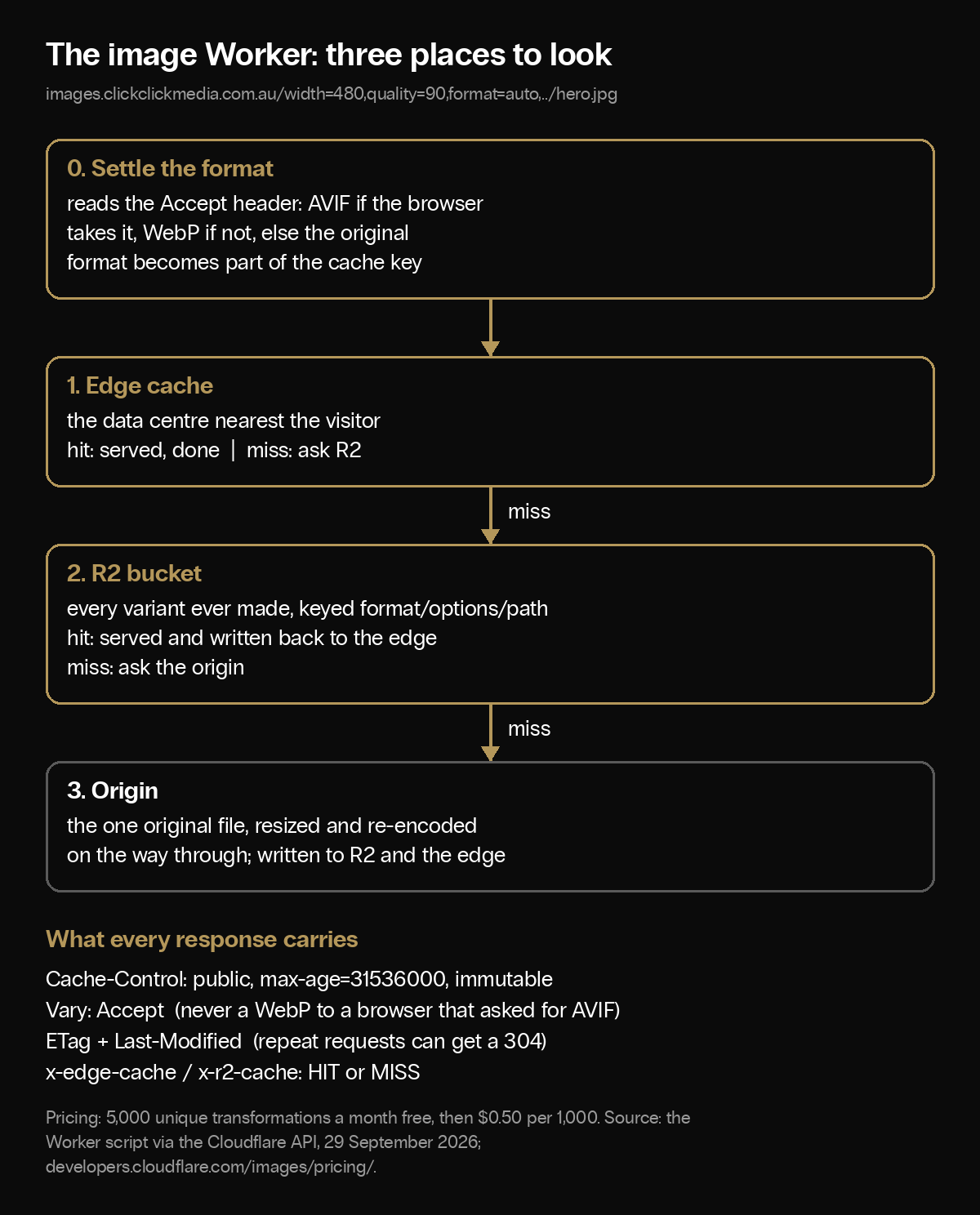
WordPress generates six or seven sizes of every upload and serves them all from the origin. Enable transformations for the zone on this page, and Cloudflare’s image service will resize and re-encode on request from a URL of the form /cdn-cgi/image/width=480,format=auto/wp-content/uploads/hero.jpg; several image plugins rewrite URLs to it. Pricing: 5,000 unique transformations a month on Images Free, after which new transformations return an error rather than a bill; the Images Paid plan adds overage at US$0.50 per 1,000. One image at one set of options is one transformation, whatever the format.
We keep one original per image and rewrite every image URL to an images subdomain with a small Worker behind it, the options in the path:
https://images.clickclickmedia.com.au/width=480,quality=90,format=auto,onerror=redirect,metadata=none/wp-content/uploads/hero.jpgWhat the Worker does, in order:
- Settles the format from the browser’s Accept header: AVIF if the browser takes it, WebP if not, else the original. Upload a PNG; the visitor gets an AVIF.
- Checks the edge cache, keyed on the URL plus the resolved format.
- Checks an R2 bucket holding every variant made so far, so a variant is made once and reused.
- Fetches the origin once, with the image service resizing and re-encoding on the way through, then writes the result to R2 and the edge.
- Sends every response with
Vary: Acceptand a one-year immutable cache header.
- Never replace an image in place. With a one-year browser TTL and stored variants, a changed file at the same URL keeps serving the old bytes. WordPress gives a new upload a new file name; keep it that way, and avoid “replace media” plugins that overwrite.
- Cap the largest candidate, not the count. A rewriter emits a candidate for every width it can justify, and the count matters less than it looks: our homepage carries 75 image tags at about five candidates each, 14 on the hero, and the repeated URL prefixes compress so well that removing every srcset on the page would save under 3 kilobytes. What costs real bytes is the top of the list. Our hero offers a 3,000 pixel candidate at
sizes="100vw", so a retina laptop with a 1,440 pixel viewport downloads the 3,000 pixel file. Cap the largest width at what the layout can use, and check sharpness on a retina screen before you settle on the number.
Step 11. AI, then AI Search
Optional. Three things on our site run on Cloudflare’s AI tooling with no outside vendor.
- Related posts by meaning. On publish, a Worker turns the post into a 768-dimension embedding with Workers AI and stores it in a Vectorize index; the theme asks for the three nearest posts at render time, cached in KV for a day. The embedding and the similarity search run on Cloudflare, not the origin.
- AI Search over the site. On this page, create an instance with your website as the source and wait for the crawl. Cloudflare crawls the sitemap with a browser renderer, stores and embeds it, and answers questions from it. Ours excludes cart, account and checkout paths, feeds, tag archives and the REST API.
- Endpoints for people and agents. Ours is exposed at
ask.clickclickmedia.com.au: an NLWeb endpoint at/askthat streams results per Microsoft’s open NLWeb protocol, and an MCP endpoint at/mcpfor AI agents. Both are rate limited and listed in robots.txt and llms.txt. The NLWeb Worker is a Cloudflare template with a deploy button, in public preview. The search endpoints live outside WordPress; the related-posts feature above does involve the theme.
Step 12. On the Free plan
- APO, Cloudflare’s WordPress page cache, is US$5 a month on Free and included on paid plans. It needs the Cloudflare WordPress plugin, caches HTML with its own bypass logic, and purges on publish. If you would rather not write the nine rules in step 1, start here and use step 3 to check it.
- No Snippets. Use the separate “Ignore query strings on public pages” rule from step 2, placed between rules 4 and 5, never the Ignore setting on rule 2 itself.
- The Free Managed Ruleset only; the Cloudflare Managed and OWASP rulesets start on Pro. One rate limiting rule with a ten-second window: spend it on the login page.
- Smart Tiered Cache is free; check it is on. Speed Brain is on by default. Cache Reserve and Polish need a paid plan; Argo is a paid add-on on every plan.
- Ten Cache Rules on Free against 25 on Pro; the nine in step 1 plus the Free Ignore rule use all ten.
What changed, 2024 to 2026
- August 2024. Auto Minify removed.
- January 2025. Cloudflare’s published schedule stopped new Page Rules and began migrating existing ones to Cache, Redirect and Configuration Rules; parts of the documentation still describe creating them, so check what your dashboard offers.
- March 2025. Security Level becomes “Always protected”; the IP threat score starts its retirement.
- May 2025. Google tag gateway for advertisers launches with Cloudflare as the first-party path.
- September 2025. Mirage deprecated. The Content Signals Policy; the managed robots.txt on 3.8 million zones rewritten to allow search and refuse training.
- August and September 2026. Bot Preference Sync replaces the managed robots.txt; from 15 September new zones default to allowing search crawlers and blocking training and agent use on pages with ads.
Checklist
- Cache public pages with a rule that includes the PURGE method, and put every bypass rule after it: WordPress endpoints, logged-in and cart cookies, feeds, the gateway path, form pages.
- Strip tracking parameters before the cache lookup: a Snippet on paid plans that rewrites only when it removed something, an Ignore rule scoped to public pages on Free.
- Check with curl and a logged-in browser: campaign URLs hit, sensitive paths stay dynamic, a logged-in document is never a
HIT. - Purge on publish with the Cloudflare plugin, test one change, warm from the sitemap.
- Smart Tiered Cache on. Rocket Loader off.
- Rate limit the login page.
- Decide search and training separately, per company, and write it in your own robots.txt.
- Verify Googlebot by address.
- Re-run the curl checks every quarter.
Implement this on your website with AI
Opens your assistant with this guide and seven questions it will ask you first: hostnames, plan, special pages. It then writes your rules, Snippet and checks with your details filled in.
Copy the prompt for Gemini, Grok or any assistant that cannot open a prefilled link. The prompt points at this page, which is also served as Markdown to assistants that ask for it.
If you would like the same read on your own site, send us the domain. You will get a one-page comparison of your clean URLs against your campaign URLs: which shapes hit the cache and which miss, the measured time to first byte for each, which bypass paths are actually bypassed, and the rule or Snippet change that would fix what we find.
Sources
Our own zone in front of clickclickmedia.com.au is the source for every setting in this guide: the configuration shown was applied to the live zone and verified with a 22-check route matrix on 30 September 2026, and the benchmark timings in the receipts are from 29 September 2026. Dashboard page names follow the links in Cloudflare’s documentation. External references:
- Cache Rules
- Cache Rules: order and priority
- Cache Rules: cache key and query-string settings
- Set-Cookie and the cache
- What cf-cache-status means
- Single-file purge and the PURGE method
- Cache Deception Armor
- Tiered Cache
- Cache Reserve
- Argo Smart Routing
- Always Online
- Snippets
- Snippet examples, including removing query strings before the origin
- Page Rules migration
- Early Hints
- 0-RTT
- Rocket Loader
- Auto Minify deprecation
- Mirage deprecation
- Polish
- Speed Brain
- HTTP/3
- TLS 1.3
- HSTS
- Encryption modes
- Image transformations via URL
- Image transformations pricing
- Improving web security for WordPress
- Deploy managed rules
- Leaked credentials detection
- Leaked credentials detection replaces Exposed Credentials Check
- Rate limiting rules by plan
- Hotlink Protection
- Browser Integrity Check
- Security Level, automated
- Super Bot Fight Mode
- WordPress loopback and bot detection
- Managed robots.txt
- Bot Preference Sync
- Content Signals Policy
- AI Crawl Control
- OpenAI crawlers
- Google’s crawlers and the Google-Extended token
- Google Ads gad_ parameters
- Google tag gateway for advertisers
- Google tag gateway on Cloudflare
- Verifying Googlebot
- WordPress REST API
- Cloudflare WordPress plugin
- Automatic Platform Optimization
- AI Search
- NLWeb on Cloudflare
- Vectorize