
The Ecommerce Design Trap: When a Beautiful Store Quietly Loses Money
Picture this. You’ve just launched your new online store. The photos look like they belong in a magazine. The fonts are perfect. Your mates say it looks like a big brand. You hit publish, pour a drink and wait for the orders to roll in.
A week later, sales are flat. A month later, they’ve dropped below what your old, clunky site used to do. Nothing’s broken. There are no error messages and no complaints. Just silence.
This is the ecommerce design trap. It’s when a store is built to impress people instead of helping them buy. We see it all the time. And it catches smart, experienced business owners, not just beginners.
The tricky part is that it’s invisible. Customers don’t email you to say your checkout annoyed them. They just close the tab and buy from someone else. In this post, we’ll show you where the money goes, how to spot the leaks in your own store and how to plug them without tearing everything down.
Pretty and Profitable Aren’t the Same Thing
Good looks matter. A clean, polished store builds trust and makes your brand feel premium. We’re not against beautiful design. We build it every day.
But looks are only half the job. A store’s real job is to get the right person to the right product, then out through the checkout with as little effort as possible. When design choices get in the way of that, beauty starts costing you money.
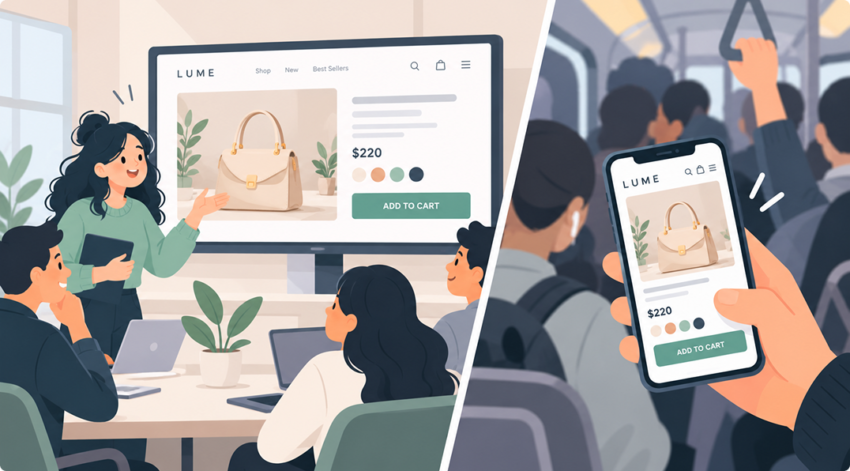
The gap usually opens up during the design phase. Mock-ups get signed off on a big desktop screen in a meeting room. They’re judged on how they look, not how they work. Nobody asks, “Can a customer on a phone, on the train, with one thumb, find a size and pay in under a minute?”
That’s the question that decides your revenue. Good UX design starts with it.
The Maths of a Quiet Leak
Small leaks add up fast. Let’s run some simple numbers on a made-up store.
| Before | After a few fixes | |
|---|---|---|
| Visitors per month | 10,000 | 10,000 |
| Conversion rate | 1.5% | 2.0% |
| Orders per month | 150 | 200 |
| Average order value | $120 | $120 |
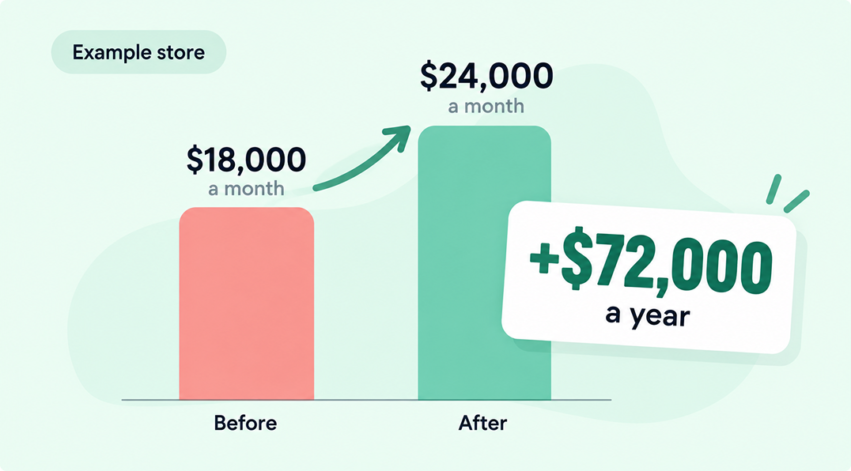
| Revenue per month | $18,000 | $24,000 |
Same traffic. Same ad spend. Same products. That half a percent lift is worth $6,000 a month, or $72,000 a year.
Now flip it around. If a redesign quietly knocks your conversion rate down by the same amount, that’s $72,000 walking out the door. And because the site looks better than ever, nobody thinks to blame the design.
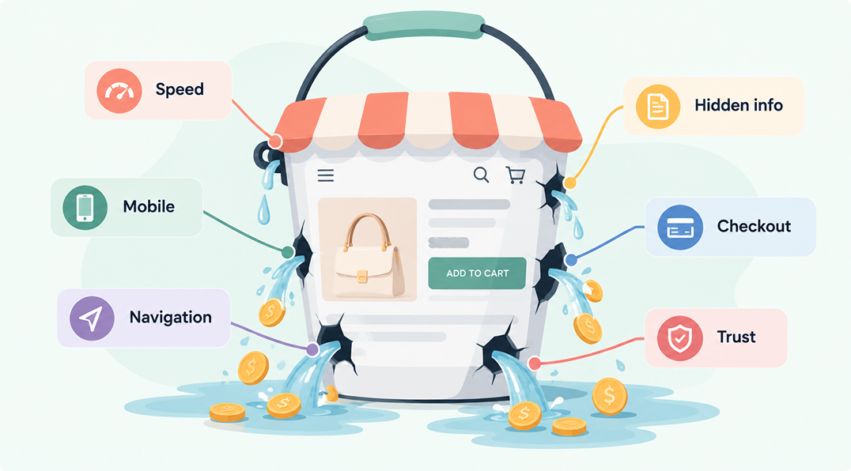
So where does that money actually go? Usually, it slips out through one of these six gaps.
Six Places a Beautiful Store Quietly Leaks Money
1. Big visuals that slow everything down
Full-screen hero videos, huge lifestyle photos and fancy animations look amazing. They also make pages heavy. On a phone with patchy 4G, that weight turns into waiting. And shoppers don’t wait.
Speed has a direct link to sales. A study by Deloitte, commissioned by Google, found that a 0.1 second improvement in mobile site speed lifted retail conversions by 8.4%. Just one tenth of a second.
You don’t have to ditch the visuals. You need to compress them, size them properly and load them smartly. Your hosting plays a big part too. We cover that in the hosting and optimisation upgrade your business can’t afford to miss.
Quick check: Load your homepage on your phone using mobile data, not Wi-Fi. Count the seconds until you can actually tap something. If you get bored waiting, so do your customers.
2. Minimal design that hides what people need
Clean layouts are on trend. But “clean” often means key info gets cut. Shipping costs vanish into a footer link. Sizing guides sit behind a tiny icon. Returns info is three clicks away.
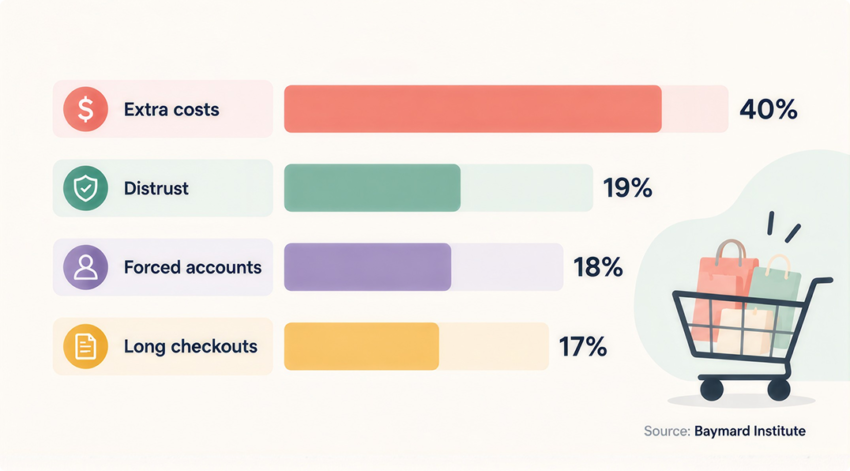
Shoppers hate surprises at checkout. According to Baymard Institute, 40% of shoppers who abandon checkout do so because of extra costs like shipping, tax or fees. Another 12% leave because they couldn’t see the total cost upfront. If people need it to decide, show it near the Add to Cart button.
Quick check: Open any product page. Can you see the delivery cost, delivery time and returns policy without scrolling or clicking? If not, neither can your shoppers.
3. A desktop design squeezed onto a phone
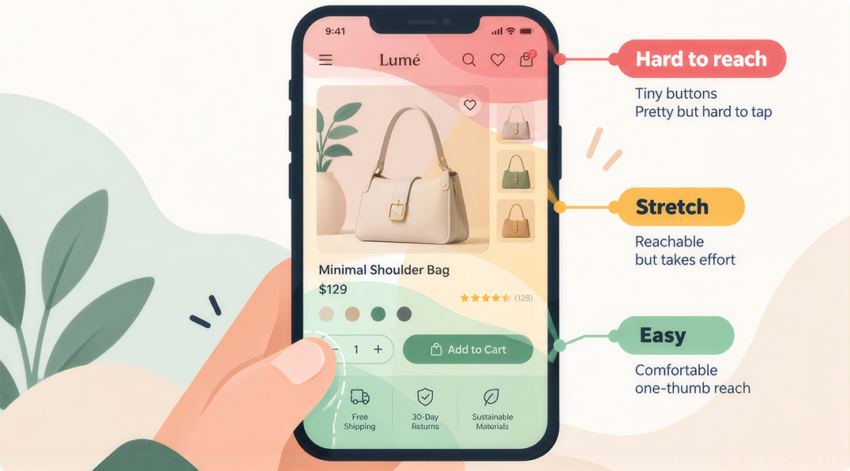
Most of your shoppers are probably on mobile. Yet many stores are still designed for desktop first, then shrunk down. That’s how you end up with tiny buttons, menus that take five taps and product images that need pinching to see.
When we rebuilt the purchase journey for SILK Laser Clinics and Australian Skin Clinics, we went mobile-first. Thumb-friendly navigation, compact product cards and product drawers instead of extra pages. In the first month, purchases rose 104.8% for SILK and 126% for ASC. Read the full case study.
Quick check: Hold your phone in one hand and try to shop using only your thumb. Every stretch, pinch and mis-tap is a moment where a customer might give up.
4. A checkout that looks sleek but asks too much
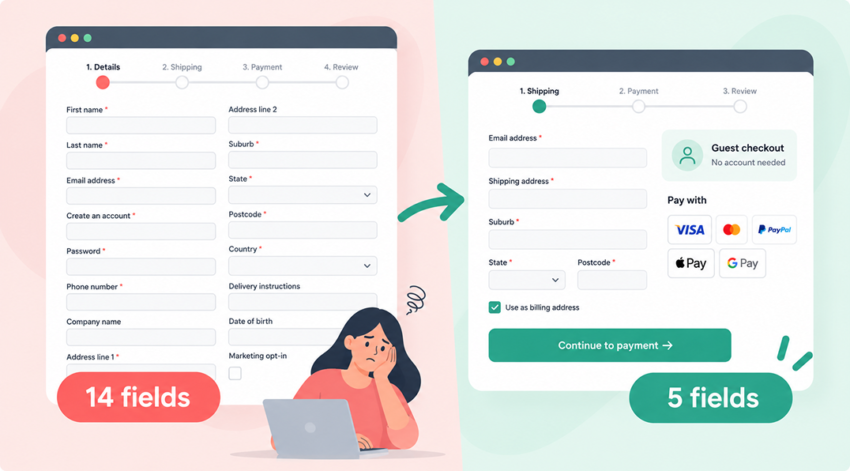
A stylish multi-step checkout can still be a slog. Baymard found the average checkout shows almost 15 form fields. Forced account creation, unclear error messages and too few payment options all add friction.
Baymard’s research suggests the average large ecommerce site could lift its conversion rate by 35.26% just by fixing checkout usability issues. That’s money you’ve already paid to attract. Offer guest checkout, cut every field you don’t need and show familiar payment options early.
Quick check: Count the fields in your checkout. Then ask of each one, “Do we really need this to ship the order?” You’ll often find a few you can cut today.
5. Navigation that’s clever, not clear
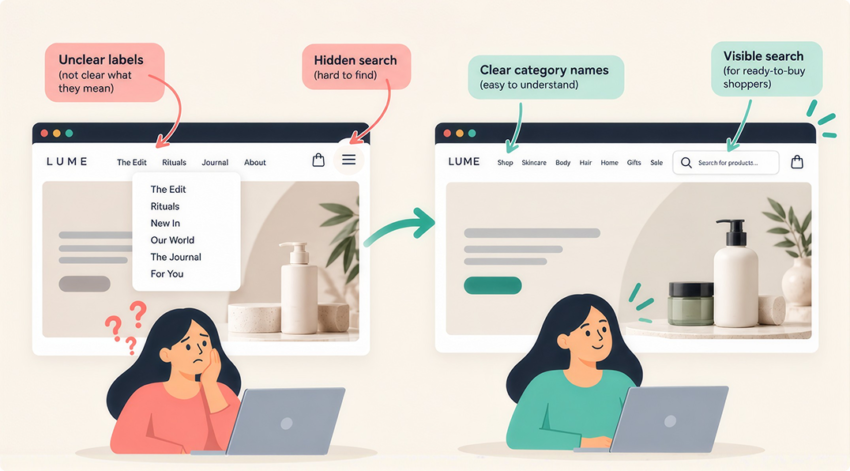
Creative menu labels and hidden hamburger menus can look slick. But if a customer can’t tell where “The Edit” or “Rituals” leads, they won’t click. Clear category names beat clever ones every time.
Site search matters too. Shoppers who search usually know what they want. A search bar tucked away for the sake of a tidy header is a missed sale.
Quick check: Show your menu to someone who’s never seen your site. Ask them where they’d find a specific product. If they hesitate, your labels need work.
6. Style over trust
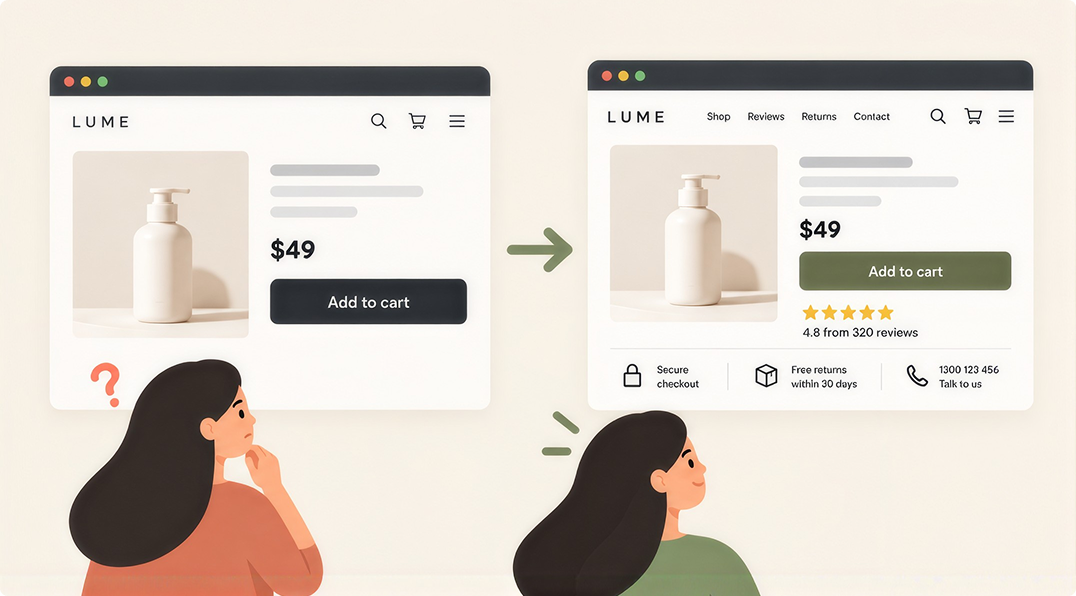
A new store with a slick design but no reviews, no clear returns policy and no contact details can feel risky. Baymard found 19% of shoppers abandon checkout because they don’t trust the site with their card details.
Trust signals don’t have to be ugly. Reviews, secure payment badges, a real phone number and a clear returns promise can all fit your brand. Even small things like colour and button contrast affect whether people feel confident enough to click.
Quick check: Pretend you’ve never heard of your brand. Would you hand over your card details based on what’s on the page? Be honest.
How to Tell if Your Store is in the Trap
You can’t fix what you can’t see. Start with your data, not your opinion of the design. Here are the warning signs:
- Traffic is steady but sales are down. People are arriving. Something on the site is turning them away.
- Mobile converts far worse than desktop. Some gap is normal. A big gap points to a mobile design problem.
- Lots of add to carts, few purchases. Your checkout or your hidden costs are the likely culprit.
- High bounce rates on product pages. Visitors aren’t finding what they need to decide.
- Sales dipped right after a redesign. The new look may have removed something that was quietly working.
To spot these, your tracking has to be right. If you’re not sure your numbers can be trusted, start with the GA4 checks every Sydney business should run. Or get our team to handle GA4 and analytics setup for you.
Then do something simple. Grab your phone. Try to buy your own best seller from a Google search, start to finish. Time it. Note every moment you hesitate. Your customers feel those same moments.
Fixing it Without Starting Over
Here’s the good news. Escaping the trap rarely means a full rebuild. Most leaks can be plugged one at a time, starting with the ones costing you the most.
- Find the biggest drop-off. Use your analytics to see where most people leave. Fix that step first.
- Bring key info forward. Show shipping costs, delivery times and returns near the Add to Cart button.
- Speed up heavy pages. Compress images, trim scripts and check your hosting. Test on a real phone, not just your office Wi-Fi.
- Simplify the checkout. Allow guest checkout, cut fields and show trusted payment options.
- Design for thumbs. Bigger buttons, simpler menus and key actions within easy reach on mobile.
- Test, don’t guess. Make one change at a time and measure the result. Keep what works.
Your platform matters here too. Whether you’re on Shopify or WooCommerce, each has its own quirks around speed, apps and checkout. A team that knows the platform well can fix things faster and avoid creating new problems.
And remember, design and marketing work together. If you’re paying for clicks through Google Shopping, every leak on your site makes those clicks more expensive. Fixing the store makes every ad dollar work harder.
FAQs
Do I need a full redesign to fix this?
Usually not. Most stores in the trap have a handful of big leaks, not a hundred small ones. Fixing the top three or four often makes a bigger difference than a brand-new look.
How quickly will I see results?
It depends on your traffic. Simple fixes like showing shipping costs earlier can show up in your numbers within a few weeks on a busy store. Smaller stores need longer to gather enough data to be sure.
What’s a good conversion rate for an online store?
There’s no single number. It changes with your industry, price point and where your traffic comes from. The best benchmark is your own store last month. Aim to beat it.
Does my platform make a difference?
Yes. Shopify and WooCommerce handle speed, apps and checkout in different ways. If you’re weighing them up, our guide to WordPress vs Shopify breaks down the trade-offs.
Can I keep my branding and still fix conversions?
Absolutely. Fixing the trap isn’t about making your store plain. It’s about making sure every beautiful element also helps people shop.
Beautiful and Profitable Can Live Together
Think about the shops you love walking into. They look great, sure. But you can also find what you want, see the price, try it on and pay without a fuss. Nobody makes you fill out a form at the door.
Your online store should work the same way. The best ones aren’t ugly and practical. They’re beautiful and easy to buy from. Every design choice earns its place by helping someone shop.
That’s how we approach ecommerce web design at Click Click Media. Our designers, developers and conversion specialists sit under one roof in Norwest. So the people who make your store look good are working right next to the people who make it sell.
Worried your store looks great but isn’t pulling its weight? Get in touch and we’ll take an honest look. No lock-in contracts. Just a clear picture of where your store is leaking money and how to fix it.