
The Simplified Guide to Domains, DNS and Hosting
Every website relies on a handful of moving parts working together. Most business owners never see them. Until something breaks.
This guide walks you through the whole chain – domain, DNS, nameservers, hosting and security – one piece at a time. No jargon. No assumed knowledge. By the end, you’ll know how your website actually works, what your business should own, and where things tend to go wrong. There’s a glossary at the bottom you can come back to any time.
First, the Big Picture
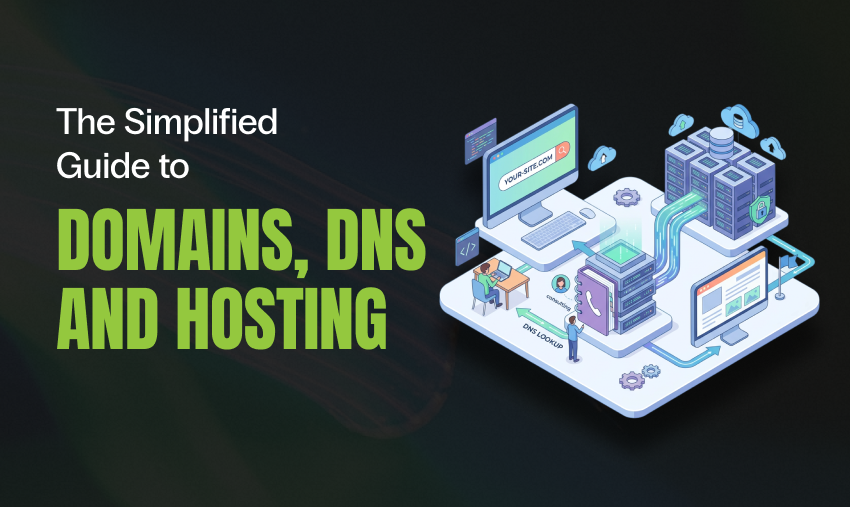
Type a web address, hit enter, and six things happen in under a second. This is the whole chain – and it doubles as the roadmap for this guide.
- Someone types your domain. A visitor enters yourbusiness.com.au into their browser. But the internet doesn’t run on names. It runs on numbers. So the hunt begins.
- DNS does a lookup. The browser asks the internet’s giant directory – the DNS – “who’s in charge of this name, and where does it live?”
- Nameservers answer. Your domain points to a set of nameservers. These are the source of truth. They hold the records that say where everything for that domain should go.
- A record hands back the address. The nameserver returns an A record – the actual numeric address (an IP, like 203.0.113.10) of the server your website sits on.
- The hosting server responds. The browser connects to that server. The host – the machine running your site – serves up your pages, images and content.
- Security sits in front of it all. Along the way, tools like SSL and Cloudflare encrypt the connection and filter out the bad traffic. So the site loads fast and safe.
That’s it. Domain → DNS → nameservers → record → host → your site. Now let’s work through the guide, one piece at a time.
1. Domain Registration: the Address
Your domain name is your address on the web – yourbusiness.com.au. It’s what people type in, what goes on your business cards, and what your email runs on. Get it right and it works quietly in the background for years.
Here’s the important bit: you don’t buy a domain, you lease it. You register it for a set period – usually one or two years – and you renew it before it expires. Let it lapse and someone else can grab it. We’ve seen businesses lose the domain they’ve used for a decade over a missed $20 renewal. So renewals matter.
The last part of the domain – the .com.au, .com, or .au – is the top-level domain (TLD). For Australian businesses, a .com.au signals you’re a local, legitimate operation. And it comes with rules: you need an active ABN or ACN to hold one. That’s a good thing. It keeps the space clean.
Worth knowing: The person or business listed as the registrant is the legal owner of the domain. Not the agency. Not the developer who set it up. Always make sure your own business is the registrant. It’s your asset. A quick domain lookup with our WHOIS tool shows who is currently listed as the registrant.
2. Domain Registrars: Who You Register With
A registrar is the company you register your domain through. Think of them as the licensed agent who books your address into the official record. In Australia, registrars are accredited by auDA, the body that oversees .au domains. Globally, that authority traces back to ICANN.
Common registrars include VentraIP, Crazy Domains, GoDaddy, Namecheap and Cloudflare Registrar, among many others. They all do the same core job. But they’re not all equal on the things that matter:
- Renewal pricing. The cheap first-year deal can hide a steep renewal. Check the ongoing cost, not the intro price.
- Control. A good registrar gives you full access to your DNS settings and never holds them hostage.
- Support. When a domain issue takes your site or email offline, you want a human who answers.
- Security features. Domain lock and two-factor login should be standard.
Your registrar and your web host can be two different companies. Often they are. That’s completely normal. The glue that connects them is DNS, which is next. If you would rather not manage this yourself, we offer web hosting in Australia.
3. DNS: the Internet’s Directory
DNS stands for Domain Name System. It’s the phone book of the internet. People remember names. Computers only deal in numbers. DNS is the translation layer that turns a name you can remember into the numeric address a machine can actually connect to. Our IP lookup tool shows the network and location details behind one of those numeric addresses.
Without DNS, you’d have to type a string of numbers to reach every website. With it, you just type the name and DNS quietly does the lookup in the background – usually in a few thousandths of a second.
DNS doesn’t just point your website. It also directs your email, verifies your domain for tools like Google Workspace, and proves you’re allowed to send mail so your emails don’t land in spam. One domain, lots of jobs. And DNS routes every one of them. If you want to confirm that last part is set up correctly, our SPF record validator checks the record that authorises your mail servers.
4. Nameservers: the Source of Truth
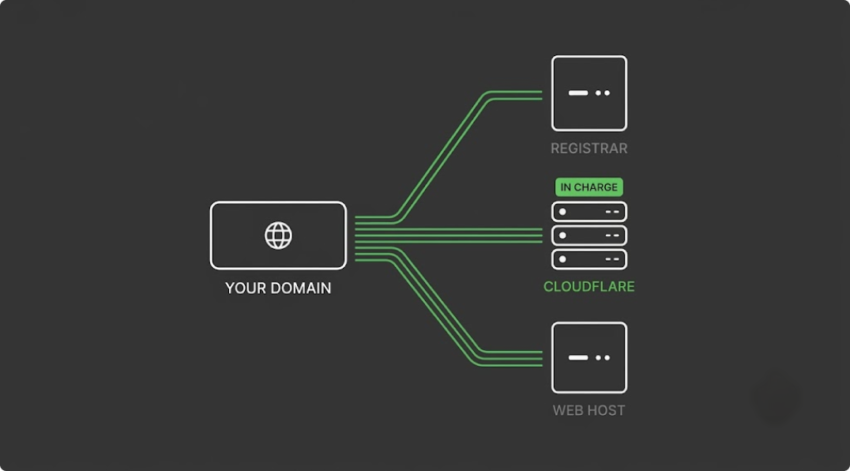
If DNS is the directory, nameservers are the specific set of servers that hold your domain’s page in that directory. Every domain is assigned nameservers. Whichever ones it’s pointed at become the boss – that’s where all the DNS records are read from.
Nameservers usually come in pairs or more, for reliability, and look like this:
ns1.example-host.com
ns2.example-host.com
This is the single most important setting to get right. Point your domain at the wrong nameservers and nothing works. No site. No email. The internet is reading records from the wrong place. Point them correctly and everything falls into line.
Common setup: Many businesses point their nameservers at Cloudflare, then manage all their records there. This puts a fast, secure layer in front of the site while keeping DNS control in one tidy dashboard. It’s an approach we use and recommend often. If your site runs on WordPress, we walk through the Cloudflare setup for WordPress we actually run, toggle by toggle.
5. How DNS is Managed
Inside your nameservers live your DNS records – a short list of instructions telling the internet where each part of your domain should go. You don’t need to memorise them. But knowing the main ones helps you understand what’s happening when something changes.
| Record | What it does |
| A | Points your domain to the numeric address (IP) of your web server. The main “here’s the website” record. |
| CNAME | Points one name at another name – handy for subdomains like www or shop. |
| MX | Directs your email to the right mail server. Get this wrong and email stops flowing. You can check where your mail is currently routed with our MX record lookup. |
| TXT | Holds verification and email-authentication records (SPF, DKIM, DMARC) that prove your mail is legit. Our DMARC record validator checks whether that record is set up properly for email security and deliverability. |
| NS | Lists the nameservers responsible for the domain. |
Where the Records Actually Live
This trips people up, so it’s worth being clear. Your DNS records can be managed in one of a few places. Only one of them is “in charge” at any time – whichever your nameservers point to:
- At the registrar – the default when you first register a domain.
- At the web host – common when the host runs your nameservers (cPanel manages this cleanly).
- At Cloudflare – a popular middle layer that adds speed and security on top.
Propagation: Why Changes Aren’t Instant
When you update a DNS record, the change doesn’t hit the whole world at once. Internet providers cache records for a set time – the TTL (time to live) – so an update can take anywhere from a few minutes to a day or so to fully propagate. That’s normal. Plan changes in advance and don’t panic if a new setting takes a little while to show up everywhere. While you wait, our DNS lookup tool lets you check what a domain’s records currently show.
6. Website Hosting: Where it Lives
Your host is the computer your website actually lives on. It stores your files, your database and your content. And it stays switched on around the clock, so whenever someone visits, the site is there to serve. If the domain is your address, hosting is the land and building it points to.
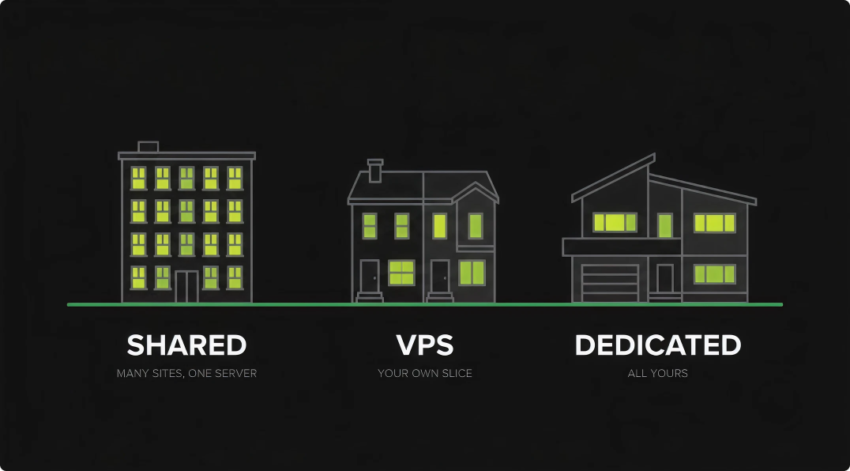
Not all hosting is the same. The main types, from smallest to largest:
- Shared hosting – many sites share one server. Cheapest option, fine for small, low-traffic sites, but you’re sharing resources with strangers.
- VPS (virtual private server) – your own guaranteed slice of a server. More power, more control, better performance.
- Dedicated / cloud hosting – a whole server (or scalable cloud resources) just for you. For high-traffic sites and serious applications.
The right choice depends on your traffic, your platform (WordPress, WooCommerce, custom) and how much a slow or downed site would cost you. For most growing businesses, quality managed hosting with room to scale is the sweet spot. And that’s where a good control panel earns its keep.
7. Why We Use cPanel
A server without a control panel is a bare Linux box. Powerful, but you’d need command-line skills to do anything with it. cPanel is the industry-standard control panel that puts a clean, visual dashboard over the top, so managing a website, email and databases becomes point-and-click.
It’s been the standard for hosting for over two decades. That means it’s stable, well-supported and genuinely familiar to the whole industry. Here’s what it gives you:
- Everything in one place – files, databases, email, DNS, SSL and stats, all managed from a single, consistent dashboard.
- Email that just works – create mailboxes, forwarders and autoresponders on your own domain in seconds.
- One-click installs – stand up WordPress and other apps quickly and cleanly, without manual setup.
- Built-in backups – scheduled and on-demand backups make it easy to roll back if something goes wrong.
- Free SSL, handled – SSL certificates can be issued and auto-renewed from within the panel, keeping the site on HTTPS.
- Fine-grained control – PHP versions, resource limits, cron jobs, databases and more, tuned per site by people who know how.
Why it matters for you: Because cPanel is standardised, any competent host or developer can pick up where another left off. You’re never locked into one person’s custom setup. It makes moving hosts, handing over access and troubleshooting far simpler – which protects you, not just us.
8. Security: Keeping it Safe
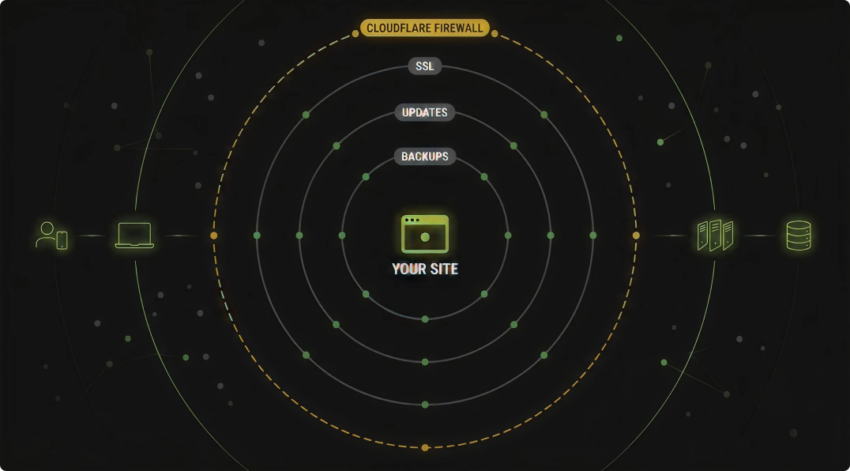
A website is a target the moment it goes live. Bots probe every site on the internet looking for a way in. Good security isn’t one product. It’s a few layers working together, each covering what the others miss.
- SSL / HTTPS – encrypts the connection between your visitors and your site. It’s the padlock in the browser bar, it’s expected by customers, and Google rewards it. Every site should have it.
- A firewall and CDN like Cloudflare – sits in front of your site, blocks malicious traffic, absorbs attacks (DDoS), and speeds up loading by serving content closer to your visitors.
- Regular updates – most hacks exploit out-of-date software. Keeping WordPress, plugins and the server patched is the single most effective habit there is. Our WordPress maintenance guide covers what that routine looks like.
- Backups – the ultimate safety net. If the worst happens, a clean recent backup turns a disaster into an inconvenience.
- Strong logins and 2FA – weak passwords are the easiest door to walk through. Two-factor authentication shuts it.
- Malware scanning – catches problems early, before they spread or hit your reputation.
- Domain lock and DNSSEC – protect the domain itself from being hijacked or transferred out from under you.
The takeaway: Security is ongoing, not a one-off. It’s why we monitor, patch and back up the sites we manage as standard – so problems get caught and handled before they ever reach you.
9. Plain-English Glossary
Domain – Your web address, e.g. yourbusiness.com.au.
Registrar – The company you register (lease) your domain through.
Registrant – The legal owner of the domain. This should be your business.
TLD – The ending of a domain: .com.au, .com, .au.
DNS – The system that translates domain names into numeric addresses.
Nameservers – The servers that hold your DNS records. Your domain’s source of truth.
DNS record – An instruction (A, CNAME, MX, TXT, NS) telling the internet where part of your domain goes.
Propagation – The delay while a DNS change spreads across the internet.
Hosting – The always-on server where your website’s files and data live.
cPanel – The control panel that makes managing a host point-and-click.
SSL / HTTPS – Encryption between visitor and site. The browser padlock.
Cloudflare – A layer in front of your site adding speed and security.
You’ve Reached the End of the Guide
You now know more about domains, DNS and hosting than most business owners ever will. The next step is checking your own setup against it. Is your business the registrant? Do you know where your nameservers point? Is someone actually patching and backing up your site?
If you’d like a straight answer on how your setup looks – and whether it’s doing you any favours – we’re happy to take a look.
