
When Your Host Upgrades PHP and Your Site Dies
The site had been running without incident for years. Nothing was deployed overnight. No one touched the code. Then at midnight, every page on the client’s website returned a 500 error. By morning, the phones were ringing.
The cause was not a hack, not a bad plugin update, not anything the client or their development team had done. Their hosting company had upgraded the server’s PHP version as part of routine infrastructure maintenance. The site’s older WordPress installation, which still relied on a function removed entirely in PHP 8.0, could not cope. One function. One server-side change with no client notification. Site down. A security advisory can force the same upgrade at short notice, which is why our CVE patching guide covers backups, staging and the version check before anything goes live.
The Client
A Sydney law firm running a professional services website on WordPress. The site had been built and maintained over several years, with the original development predating the more recent content and SEO work CCM had been managing. The site was business-critical: new client enquiries came through it, and the contact form was the primary inbound channel.
What Happened
Hosting companies run PHP upgrade cycles regularly. Most send notifications, but those notifications go to the account holder’s email address, not necessarily to the website owner or developer. In this case, the PHP version on the shared server was upgraded from 7.x to 8.x. The change happened overnight.
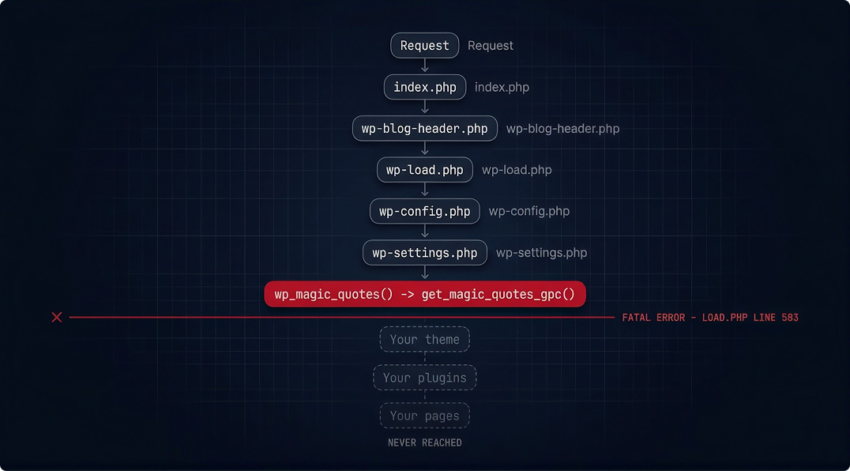
The site’s WordPress installation was old enough that it still called get_magic_quotes_gpc(), a PHP function that had been deprecated since PHP 5.4 and removed completely in PHP 8.0. The moment the host changed the PHP version, every request to the site triggered a fatal error at the framework level before any page could load.
PHP ERROR LOG: site down, April 2025
PHP Fatal error: Uncaught Error: Call to undefined function
get_magic_quotes_gpc() in …/wp-includes/load.php:583
Stack trace:
#0 …/wp-settings.php(243): wp_magic_quotes()
#1 …/wp-config.php(91): require_once(…)
#2 …/wp-load.php(37): require_once(…)
#3 …/wp-blog-header.php(12): require_once(…)
#4 …/index.php(17): require(…)
#5 {main}
The stack trace is unambiguous. WordPress is trying to call wp_magic_quotes(), which in turn calls get_magic_quotes_gpc(). That function does not exist in PHP 8.0. The entire boot sequence fails on line 583 of load.php, before a single page or plugin loads. There is no recovery path. The site returns a 500 error on every request until something changes.
What get_magic_quotes_gpc() Is and Why It Matters
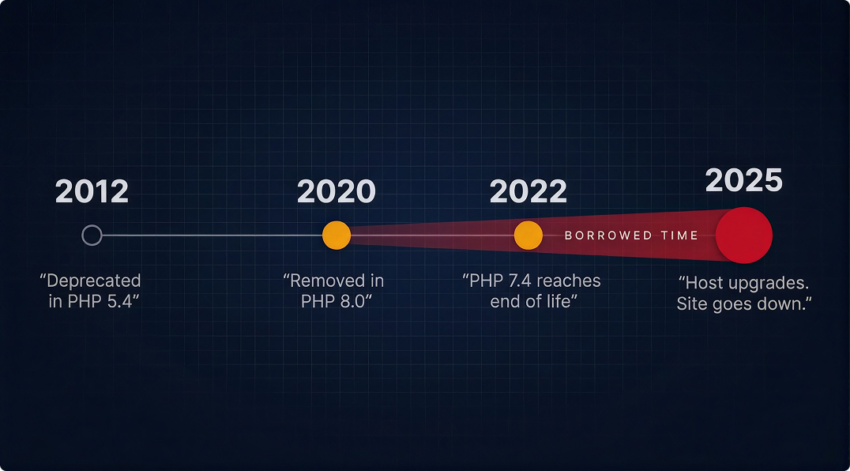
“Magic quotes” was a PHP feature that automatically escaped incoming data. Quote characters in form submissions, for example. It was intended as a security measure but was widely considered a flawed approach and deprecated in PHP 5.4. PHP 8.0, released in November 2020, removed the function entirely.
Any WordPress installation old enough to still reference this function was written before PHP 8.0 existed. That code has been working on borrowed time since November 2020. Every time the host deferred upgrading to PHP 8.x, the site got another reprieve. When the host finally made the change, the site stopped working immediately.
“The crash was not a surprise to the server. The function had been officially deprecated for over a decade. It was a surprise to the business, because no one had audited the site’s PHP compatibility before the host forced the issue.”
The Diagnosis
When CCM was called in, the error log told the full story within minutes. A PHP fatal error at the framework level, on a function that PHP 8.0 does not recognise, triggered by a hosting-side PHP version change. The diagnosis required no guesswork. The error message, the stack trace, and the timing of the crash all pointed to the same cause.
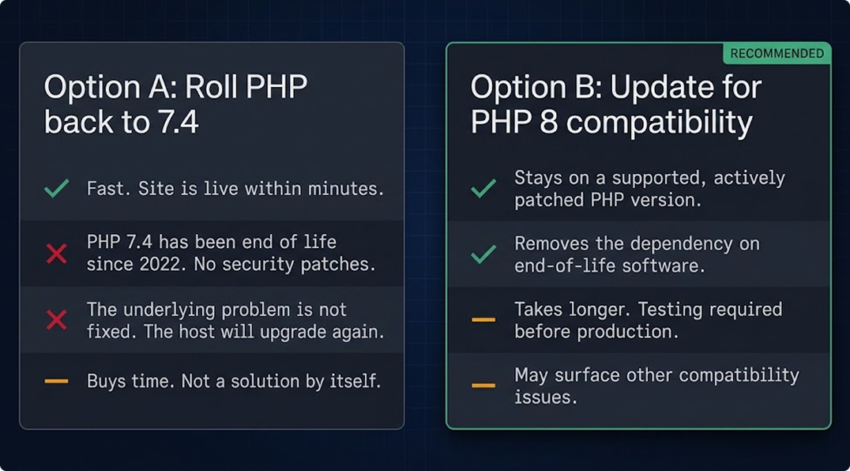
Two paths existed to get the site working again:
| OPTION A: Roll PHP back to 7.4 Fast. Site is live within minutes. PHP 7.4 has been end of life since November 2022. No security patches. The underlying problem is not fixed. The host will upgrade again. Buys time to do the proper work. Not a solution by itself. | OPTION B: Update for PHP 8 compatibility Leaves the site on a supported, actively patched PHP version. Takes longer. Testing required before pushing to production. The right answer. Removes the dependency on EOL software. May surface other compatibility issues that need resolving. |
CCM assessed both options against the client’s immediate needs and timeframe, implemented the fix, tested the site, and confirmed it was functioning within the two-hour window.
The Warning Signs That Come Before the Crash
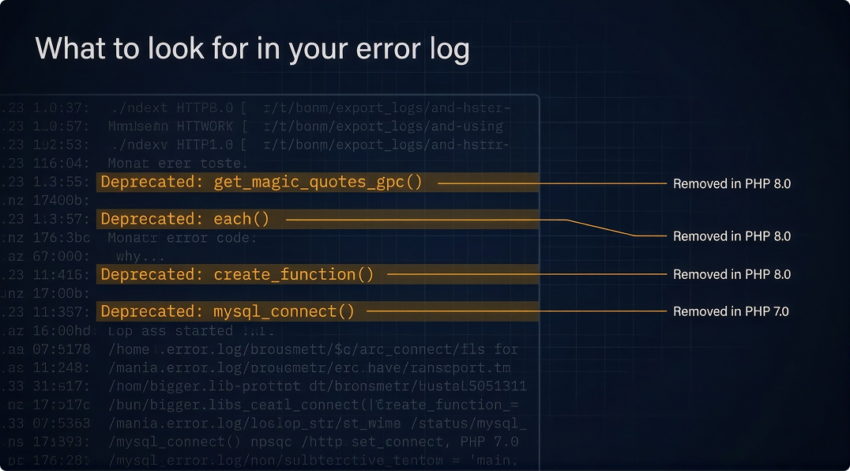
This does not happen without warning. PHP deprecated notices appear in error logs months or years before a function is removed. A site running an old WordPress installation on PHP 7.x will show deprecated warnings in its logs every time pages load. Those warnings are the pre-crash signal.
The problem is that most site owners do not see their error logs. They see the front end of their site, which looks fine. The deprecated notices accumulate silently. Then the host upgrades PHP, the site crashes, and it looks like something went wrong without warning. It did not. The warnings were there. Nobody was looking at them. Reviewing logs belongs in regular upkeep, and a WordPress maintenance guide for Australian businesses can tell you how often to do it.
What to look for in your error log: Any line containing Deprecated: or Call to undefined function is worth investigating. If you are seeing get_magic_quotes_gpc, each(), create_function(), or mysql_connect(), your site has code that will not survive a PHP 8.x upgrade.
What This Means for Your Site
If your website is running on a hosting plan where you do not control the PHP version, your host’s upgrade schedule is a risk you carry whether you know about it or not. Most shared hosting providers are actively moving infrastructure to PHP 8.x. Sites that have not been maintained to keep pace with those upgrades are in the same position this client was in before the crash. Better hosting supports speed, security and reliability, which makes the hosting and optimisations upgrade worth a look for sites in this position.
The fix is not complicated. But it requires someone to look at the error logs, check the PHP version, test the site against the next PHP version before the host forces it, and update anything that does not pass. That is PHP version maintenance. It is routine work when done proactively. It is an emergency when left until the site goes down.
For more on how to think about PHP runtimes and version decisions, the PHP runtime picker can help identify the right setup for your production environment.
Has Your Site Had a PHP Compatibility Check?
If your WordPress site has not been tested against PHP 8.x and your host is on a shared server, the question is when it breaks, not whether. Our PHP development team in Sydney can review your error logs, check your current PHP version, and identify what needs updating before your host makes the decision for you. Contact us at clickclickmedia.com.au/contact-us/.