
Citation Cleanup and Consistency: A 12-Check Local SEO Audit
TL;DR
- Citation cleanup means finding every online listing of your business and making the name, address and phone number match one agreed record.
- It’s usually the first job in a local SEO campaign, because everything else is checked against those details.
- The audit has 12 checks in four areas: the master record, finding listings, fixing them and keeping them clean.
- Mark each check Pass, Fail or Not sure, and the scorecard groups your results by who owns the fix.
- Checks flagged High priority settle the facts everything else depends on. Fix those first.
- Allow roughly two to three hours for a single-location business.
Google checks whether the details it finds about your business around the web agree with each other, and the answer can affect your map-pack ranking. If your website shows one phone number, a directory shows another and an old listing still carries your previous address, Google has to decide which one is right, and it may choose wrongly.
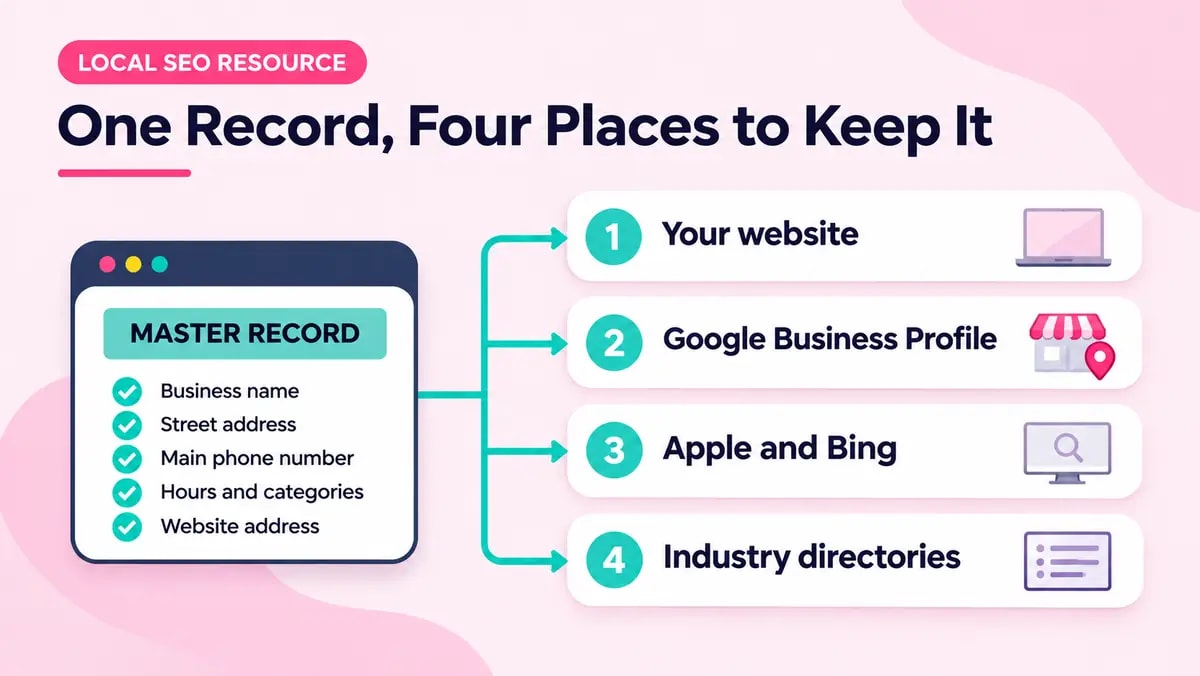
Citation cleanup means finding those listings and fixing them. A citation is any mention of your business name, address and phone number outside your own website, such as a directory entry or a maps listing. It’s the first thing our local SEO team in Sydney does on a new campaign, because everything else is measured against those details. The 12 checks below are the ones we work through, with an owner named for each fix so the work keeps moving.
Why consistent details matter for the map pack
Google says local results are based mainly on relevance, distance and prominence, and that businesses with complete and accurate information are more likely to appear. Its guide to local ranking explains each one. Accuracy is the factor you control most directly, and a listing with outdated details works against it.
Citation work has a poor reputation, and some of it is deserved. The usual package submits a business to dozens of directories, hands over a spreadsheet and stops, leaving old duplicates in place and nobody watching for new ones. Our local SEO services page takes the same view. A short list of correct listings that someone keeps checking will do more for you than a long list nobody revisits.
Who owns each part of the work
These problems last because the people who can fix them aren’t always the ones who spot them. The business owner holds the details and the logins, the developer controls the website, and a specialist knows where duplicates usually turn up. Without a named owner for each, a cleanup usually stalls after the first few easy fixes.
| Part of the work | Usually introduced by | Should be owned by |
|---|---|---|
| The agreed business details | Nobody, they change over time | The business owner |
| Website name, address, phone and schema | Whoever built or last edited the site | The developer |
| Google Business Profile | The owner, often years ago | The business owner, with specialist review |
| Duplicate and old listings | Past moves, rebrands and previous agencies | The local SEO specialist |
| Listing logins and access | Whoever claimed each listing | The business owner |
How to use this resource
Open this page next to your Google Business Profile and a blank sheet for notes. Each check explains what to look for, where to look and what a good result looks like. Mark it Pass, Fail or Not sure, and the scorecard at the bottom groups your Fails and Not sures by owner.
Do check 11 first, before you change anything, so you have a baseline to compare against.
The master record: Checks 1 to 3
One master record of business details exists HighBusiness owner
Before you fix anything, you need to know which version of your details is correct. Say a plumber appears as “Smith & Sons Plumbing” on the website, “Smith and Sons” on Google and “Smiths Plumbing Sydney” on a directory. Nobody can tell which one is right.
A shared document or spreadsheet. Record your exact business name, address, main phone number, website address, hours, primary category and a short description, written the way they should appear everywhere.
Website details match the master record HighDeveloper
Google and the directories check every listing against your website, so the site needs to agree with itself. If your footer, contact page and schema each show slightly different details, correcting your listings will only get you part of the way.
Footer, contact page and LocalBusiness schema. Compare the contact details in all three. Google’s Rich Results Test or the Schema Markup Validator will show the values in your schema.
Google Business Profile matches the master record HighBusiness owner
Your Google Business Profile is the listing the map pack uses, so get it right first. The business name is where most profiles go wrong. It should be your real-world name, such as “Smith & Sons Plumbing”, and not “Smith & Sons Plumbing | Plumbers Sydney”. Extra keywords or locations break your name match with every other listing, and under Google’s name guidelines they could get your profile suspended.
Your Business Profile dashboard. Compare the name, address, phone number, website link, hours, primary category and service areas with your master record. The name should match your signage, website and stationery exactly. Services and locations belong in the category, services and service area fields.
Finding every listing: Checks 4 to 6
Duplicate listings found and recorded HighLocal SEO specialist
Duplicates split your reviews and often carry old details. They usually appear after a move, a rebrand or a change of owner, or when a past agency created listings without telling you.
Google Maps, Google and Bing. Search your business name alone and with your suburb. Look for a second pin at your address or a listing under an old name, and record each one with its link.
Old addresses and phone numbers traced HighLocal SEO specialist
Most inconsistent listings come from an old phone number or address. A former office or a tracking number from an old campaign can sit on a listing for years.
Every number and address you have used. That includes past premises, previous owners’ numbers and tracking numbers. Search each one in quotation marks on Google and Bing and note what comes back.
Major platforms and industry directories checked MediumLocal SEO specialist
Each mapping platform and industry directory keeps its own copy of your details. Your Google profile can be correct while Apple Maps or a trade directory still shows the wrong phone number.
Apple Business Connect, Bing Places and your industry directories. Trades often check hipages, Oneflare and Yellow Pages, and other industries have their own. Confirm each one has a listing and compare it with your master record.
Fixing it: Checks 7 to 9
Every listing is claimed and the logins are recorded HighBusiness owner
If you can’t log in to a listing, you can’t change it. Many were claimed years ago by an ex-employee, an old agency or a personal email address nobody checks.
A password manager or access sheet. Record which email address owns each listing and who else can get in, then move ownership to a business email address that will outlast any one staff member.
Duplicates resolved through each platform’s own process MediumLocal SEO specialist
Editing a duplicate to match your real listing doesn’t remove it. Each platform has its own process for merging or removing duplicates, and using it is what stops the listing coming back.
Each platform’s help centre. Follow the current steps for merging or removing duplicates. Keep a screenshot and the date of each request, as some take several weeks.
Fixes made in a deliberate order and logged MediumLocal SEO specialist
If you fix directories before your website and Google profile, you may end up correcting details that are still changing. A set order and a change log make the job easier to repeat, and show what changed if rankings move.
A simple change log. Start with your website, then Google, then Apple and Bing, then industry directories. Record the date, the listing, what changed and who changed it.
Keeping it clean: Checks 10 to 12
Service area and address display decided once MediumBusiness owner
If you travel to customers, you might show your address on some listings and hide it on others. Mixed signals make it harder for Google to tell where you work, and they can create duplicates.
Your Business Profile and each directory. Decide whether to show or hide your address, and describe your service area in the same words everywhere, including on your website.
Map-pack position tracked before and after HighLocal SEO specialist
You can’t tell whether the cleanup worked without a starting position. Map-pack rankings vary by suburb, so one citywide figure hides most of the movement.
A rank tracker with a local grid, or manual suburb checks. Record your map-pack position for each priority search and suburb before changing anything, then check again at regular intervals.
A process exists for changing business details MediumBusiness owner
Details go out of sync whenever something changes. A new phone number or a move gets updated in one place and missed in the rest.
Ask who was told the last time your details changed. Find out whether the master record was updated first and whether anyone checked the listings afterwards.
Your scorecard: who owns the fixes
Mark at least one check to see which person or team owns your Fail and Not sure results.
What to fix first
If you find several problems, work through them in this order. It starts with the checks that settle the facts and the baseline, then moves to the wider clean-up.
| Priority | Checks | Why |
|---|---|---|
| Fix first | 1, 2, 3, 4, 5, 7, 11 | These settle the master record, correct the website and Google Business Profile, find the duplicates and secure the logins. Every other check depends on them. |
| Fix this month | 6, 8, 9, 10, 12 | These clear the wider set of platforms and directories, then put a process in place so the details stay consistent. |
If you have several locations, expect a longer audit, since each one has its own listings. The Pro Cut suburb rollout shows how this scales across a network, and the Aussie Home Services results show what a sustained local campaign can achieve, with keywords growing from 216 to 860.
If the audit turns up several Fails, or you'd like someone to look over your listings, our local SEO team in Sydney can run the citation audit, record a map-pack baseline and explain what's holding your listings back.
Frequently Asked Questions
What is a citation in local SEO?
A citation is any mention of your business and its contact details on a site other than your own, such as a directory, a maps platform or an industry listing. It does not need to include a link. Google uses these mentions, together with your Google Business Profile and website, to confirm that your details are accurate.
What is NAP consistency?
NAP stands for name, address and phone number. NAP consistency means those three details match everywhere your business is listed and are written in the same format. The usual culprits are small differences such as Street and St, or an old phone number left on a single directory.
Do citations affect map-pack rankings?
Google says local results are based mainly on relevance, distance and prominence, and that profiles with accurate, complete details are more likely to appear. Clean, consistent listings support that accuracy. They are one input among several, so they work best alongside a complete Google Business Profile, reviews and local content.
Should I add keywords to my Google Business Profile name?
No. Use your real business name, exactly as it appears on your signage and website. Google's guidelines say extras such as services or locations are not permitted in the name field and could result in your profile being suspended. Added keywords also stop your name matching your other listings, which weakens NAP consistency.
How many directories should a business be listed on?
A smaller number is usually better. Accurate listings on the major platforms and the directories your customers actually use will do more for you than a long list that was submitted once and never checked again.
How do I find duplicate listings?
Search Google and Bing for your business name, your current and previous phone numbers and any former address. Then look on Google Maps for a second pin at the same location and check the main directories for your industry. Write down every listing you find, including the ones you did not create.
How long does a citation cleanup take?
A single-location business with a handful of problem listings can often be sorted within a few weeks. Businesses with several locations, or a history of moves and rebrands, take longer, because each duplicate has to be resolved through that platform's own process.
Want a Second Pair of Eyes on Your Listings?
If Google can't trust your details, it's less likely to show you in the map pack. That's the whole reason this audit exists.
Work through the 12 checks and you'll find most of what's out of sync. But some fixes take more than a quick edit: duplicates that keep coming back, listings locked under an old agency's login, or a multi-location business with years of moves behind it. That's where our local SEO team in Sydney picks it up.
A free local SEO audit gives you:
- A written review of your Google Business Profile and key listings against all 12 checks
- A map-pack baseline for your priority searches and suburbs, so you can see what moves
- A prioritised fix list showing who owns each job, with no obligation to proceed
No lock-in contracts. Google Premier Partner. In business since 2008.
Book your free local SEO audit or call 1300 781 961 and ask for the SEO team.
Listings already clean? The next place to earn a mention is Google's AI answers. Read how to get cited in Google's AI Overviews.
