
Ecommerce SEO and Google Ads for Australian Online Retailers
Written by Andrei Jach, Senior Manager, SEO and Analytics Specialist at Click Click Media · Research led by Phillip Wendell · Published 13 October 2026
Ecommerce SEO decides whether shoppers land on your category and product pages or on a rival’s. Australians spent $82.6 billion online in 2025, up 14% on the year before, and 9.8 million households, 82% of the total, shopped online. How much of that spending reaches your store depends on three things. Your product pages need to rank for the right searches, and your Google Shopping feed needs to be clean enough to compete. New sales also need to stay profitable once returns and delivery costs are counted.
CCM’s research below found that the page Google ranks depends on how the search is worded. A store search returned home pages, while a product search returned mostly category and collection pages. A shopper searching women’s merino wool jumper should land on that category instead of a homepage they then have to click through.
This guide starts with category and product pages, where the revenue is, and the technical work behind them. It then covers product feeds, Shopping and Performance Max, and finishes with buying guides, links and a six-month plan.
Implement this playbook with AI
Opens your assistant with this playbook and seven questions about your business: services, area, website and ads. It then writes your keyword map, page plan and Google Ads starter build with your details filled in.
Copy the prompt for Gemini, Grok or any assistant that cannot open a prefilled link. The prompt points at this page, which is also served as Markdown to assistants that ask for it.
CCM Research: What Retail Searches and Ads Show
In CCM’s Australia-wide captures on 3 September 2026, all 10 page-one results for online pet store were store home pages. On dog food online, only 5 of 10 were home pages, and 17 of the top 30 results were category or collection pages.
Build a category page for each product search you want to win, because Google answered the product search with category pages and kept home pages for the store search. Check the results for your own categories, since two searches show a pattern rather than a rule.
Source: CCM search captures, Australia, 3 September 2026
Google’s Merchant Center tracking tag (srsltid) appeared on 23 of 30 organic results for dog food online and 22 of 30 for online pet store in CCM’s 3 September 2026 captures. It appeared on only 2 of 163 results for the agency and platform searches captured the same day.
Treat your Merchant Center feed as part of your SEO, because the tag suggests product data now shapes ordinary organic listings for stores. Keep titles, prices and stock in the feed the same as on the page.
Source: CCM search captures, Australia, 3 September 2026
In CCM’s analysis of Semrush ad history from September 2025 to August 2026, the shopper search online pet store drew one ad record in 12 months, from a pet-food brand, while six agency and platform searches drew 46 ad records from 21 advertisers.
On a store search like this, a Search text ad for your store or category may meet few rivals. Semrush does not record Shopping ads, so this says nothing about the Shopping auction. Check the auction insights report in your own Google Ads account before you set bids.
Source: CCM analysis of Semrush ad history, Australia, September 2025 to August 2026
Method: The page-type and feed findings come from CCM’s Australia-wide desktop captures (DataForSEO, Google location 2036) on 3 September 2026 of two shopper searches, online pet store and dog food online, read to the top 30 results. A home page is a result whose web address has nothing after the domain, and the 163-result comparison uses the agency and platform searches CCM captured the same day. The ad finding uses CCM’s analysis of Semrush ad history for online pet store and six agency and platform searches (ecommerce seo agency, ecommerce website design, shopify seo agency, ecommerce marketing agency, ecommerce seo and google shopping agency), from monthly snapshots taken on the 15th between September 2025 and August 2026. Semrush keeps one row per advertiser per month, which we count as an ad record, and its ad history covers Search text ads rather than Shopping ads.
Ecommerce SEO: How Australians Search for Products
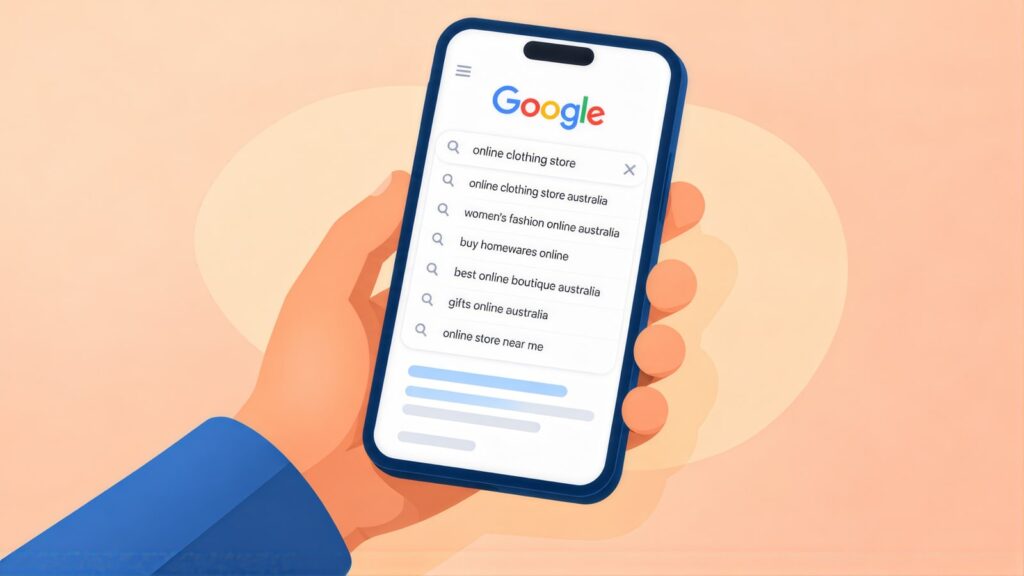
The searches that end in a sale are specific, naming a product type, brand, material, colour or use. Someone who types organic cotton fitted sheet queen size Australia is ready to buy, and the store with a well-built page for that search usually gets the sale.
In our research, a product search such as dog food online returned mostly category and collection pages, while a search for a store returned home pages. When a homepage ranks for a broad category term, the shopper has to click again to find the product they searched for. A category page built for that search shows it straight away. Category pages are usually a store’s main organic landing pages, so focus your ecommerce SEO work there.
Bathroom Sales Direct is a national bathroomware retailer. Its 90-day result, recorded with our Google Ads management service, reads: “Outcome (90 days): +1,771% increase in conversions and +204% revenue growth, driven by +834% more clicks from high-intent shoppers.”
Blacktown Building Supplies is a Western Sydney store with more than 30,000 products. Since the work began in 2019, online revenue is up 2,000%+, and organic conversions rose 225% from 2024 to 2025 alone, as the Blacktown Building Supplies story sets out.
Keyword Research Mapped to Category Pages
Shoppers search by product type, brand, feature, delivery need, occasion and comparison. For the biggest terms, CCM’s Keyword Planner pull of 1 October 2026 (Australia, 12-month averages) shows about 74,000 searches a month each for sofa bed and rugs, and 8,100 for linen sheets. Those volumes may include close variants such as rug, because Google reports singular and plural forms as one keyword. The long tail of narrower searches around each one is where a smaller store can rank first.
A three-step keyword method
- Build a keyword grid. List your categories down one side. Across the top, list the words shoppers add: material, size, colour, use, “Australia”, “free shipping”. Each filled cell is a search to consider.
- Collect real searches. Check Google Search Console for what already brings you views in Google. Type each category into Google and note the suggestions that drop down. Do the same in Amazon’s search box, which shows how people phrase product searches.
- Find the gap. Compare the categories rivals rank for with yours. Confirm the numbers in Keyword Planner, then match every group of searches to one category or product page.
Product Category
buy [product type] Australia
[product type] online
[product type] Australian made
best [product type] Australia
Brand + Product
[brand] [product] Australia
[brand] outlet Australia
[brand] stockist Australia
authorised [brand] retailer
Attribute Searches
organic cotton [product]
waterproof [product] Australia
[size] [product] Australia
sustainable [product category]
Delivery Intent
free shipping [product] Australia
same day delivery [product]
[product] next day delivery
express delivery [product type]
Gift and Occasion
gifts for [recipient] Australia
[product type] gift ideas
[product] for birthday Australia
personalised [product] Australia
Comparison Research
best [product type] Australia review
[product type] comparison Australia
[product] vs [product]
is [brand] worth it Australia
Category, Product and Policy Pages

Category pages are a store’s main ranking pages, and product pages are where the sale is made. Shipping, returns and About pages answer the questions shoppers have along the way.
| Page type | What it does for SEO | What to include |
|---|---|---|
| Category pages | Your most important organic pages, where shoppers move from searching to buying. | A real introduction of 200+ words, filters and sorting, a product count, reviews and delivery details, and a category FAQ |
| Product pages | They rank for product searches and turn visits into sales. | Your own description (not the maker’s copy), variants, specs, several images, reviews, a delivery estimate, the returns policy and related products |
| About / brand story | They build trust when people search your brand. | How you started, your Australian credentials, where you source from, and your team if relevant |
| Shipping and returns | They help shoppers trust you enough to buy. | Shipping costs or the free shipping threshold, delivery times by state, and how returns and exchanges work |
Title tag templates
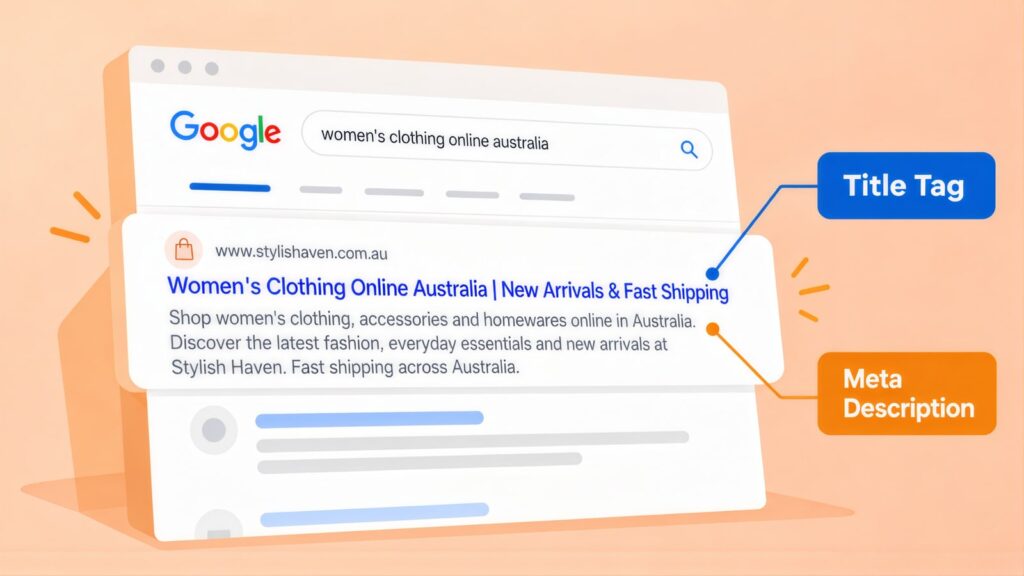
The title tag is the clickable headline in Google’s results. With hundreds of pages, write templates once and check them in a keyword and meta planner. Aim for 40 to 50 characters:
- Categories: [Product Category] | Free Shipping Over $X (42 characters)
- Products: Buy [Product Name] Online | [Key Attribute] (43)
- Brand pages: [Brand] Australia | Authorised Online Stockist (46)
Brand names differ in length, so your store’s name only goes on the end if the whole title stays inside 55 characters. Google usually shows the site name above the result in any case, so trim the store name before anything else.
A meta description is the summary line that can appear under the title in results. A category one might read: “Shop [product category] online with free delivery over $[X], genuine reviews and easy returns from an Australian store. Order by [time] to ship today.” (150 characters)
Technical Ecommerce SEO: Filters, URLs and Migrations
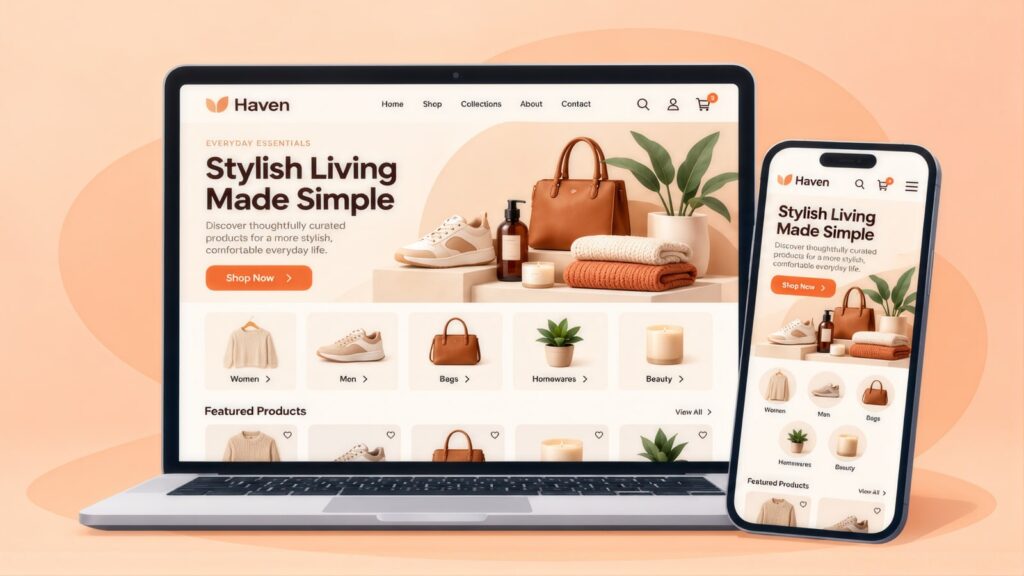
Common technical ecommerce SEO problems come from filters, page numbering, URL changes and products that go out of stock.
Pagination and faceted navigation
Long categories split across page 1, page 2 and so on. Google’s pagination guidance says to give each of those pages its own URL and its own canonical. A canonical is a tag that tells Google which version of a page is the main one. Do not point page 2 onwards at page 1. Filtered URLs, such as colour=red or size=medium, are different. Point their canonical at the base category, or keep faceted URLs out of the crawl. The exception is a filter combination with real search volume, which deserves its own landing page.
URL structure
Keep URLs short, readable and stable. Use /bathroom-vanities/ and /bathroom-vanities/wall-hung/ rather than IDs and session codes. Decide early whether product URLs sit under a category or at the root. Changing the pattern later means redirecting every product.
Migrations and redirect mapping
A platform move, such as WordPress to Shopify, puts a store’s organic revenue at risk. Before launch, map every old URL with traffic or links to its closest new URL. Use permanent server-side redirects, as Google’s site move guidance describes. Keep the redirects in place for the long term. Watch Google Search Console for crawl errors in the weeks after. One WordPress to Shopify migration of a store with more than 5,000 products shows the scale involved, including rebuilding its product feeds so Shopping kept running.
Selling into more than one country
If you run separate Australian and New Zealand (or other) versions of the store, use hreflang tags to tell Google which page serves which market. Google’s localised versions guidance explains the setup, which stops Australian shoppers seeing NZD prices.
Speed, stock and structured data
- Test key category pages in PageSpeed Insights each month. Large images, third-party scripts and heavy checkouts are common causes of slow pages. Each platform has different speed problems, as this look at Shopify, WooCommerce and Magento SEO explains.
- Keep pages for temporarily out-of-stock products live with a back-in-stock form. Redirect products you have dropped for good, with a permanent (301) redirect, to the closest active category or product.
- Add Product markup to every product page. This code makes it eligible for product rich results that show price, stock and review ratings.
Trust Signals That Convert Shoppers
Because online shoppers cannot touch the product, they rely on accurate photos, genuine reviews, clear delivery and returns terms, and an Australian business behind the store.
| Trust signal | Why it matters | How to use it |
|---|---|---|
| Real product photography | Photos that show colour, size and texture accurately set the right expectations and prevent returns. | Use several angles, lifestyle shots and size references. Replace maker images that do not show the product accurately. |
| Verified reviews | Reviews let shoppers judge a product they cannot handle. A page with none gives them nothing to go on. | Send review requests after each purchase through a review platform (Yotpo, Okendo, Shopify Product Reviews). Show the count and rating on category and product pages. |
| Delivery and returns | A surprise delivery charge or unclear returns terms give shoppers a reason to leave at checkout. | Show the shipping cost or threshold, estimated delivery and returns policy on every product page, not only in the footer. |
| Australian business details | A local business is easier for shoppers to contact about after-sales support and returns. | Put your ABN, Australian address and customer service contact in the footer and on the About page. Say “Australian owned” only where accurate, because the ACCC treats false or misleading claims seriously. |
Product Feeds and Merchant Center
Your Google Merchant Center feed is the product list behind every Shopping campaign and free listing. Each item needs an accurate title, description, price and stock status. It also needs a GTIN (the barcode number) where one exists, and images that meet Google’s specs. From 31 January 2027, Google requires product images of at least 500 x 500 pixels for all products. Until then, each category has its own minimum.
Fix feed errors one category at a time. A successful upload does not mean every item can show. Sync stock between your store platform and Merchant Center, so products are marked out of stock the moment they sell out. Otherwise they keep drawing paid clicks you cannot fill.
Google Shopping and Performance Max
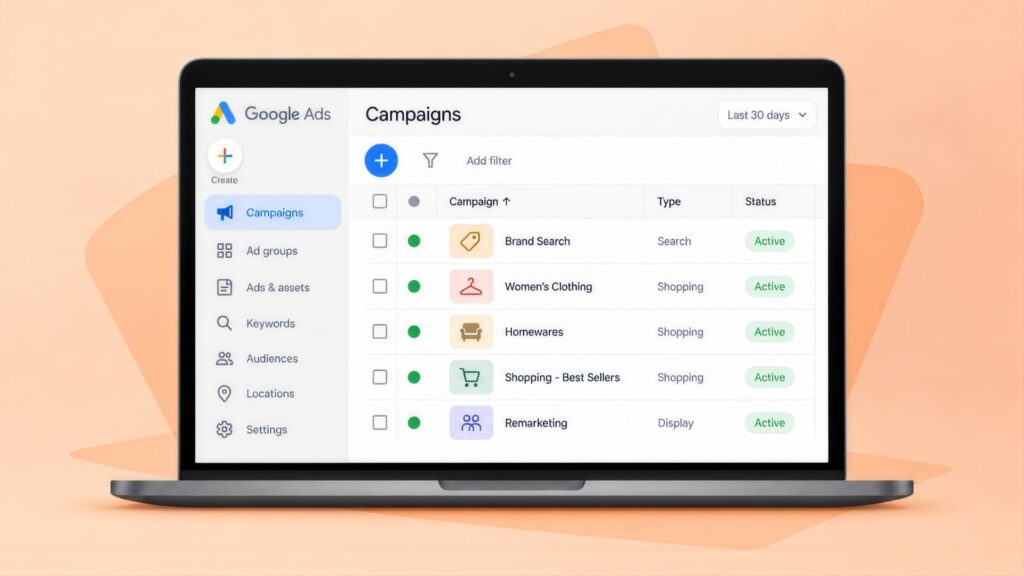
For a product retailer, Google Shopping campaigns are usually the first paid channel to set up. Shopping ads show a product’s photo, price and store name, all drawn from your feed. The quality of that feed therefore affects how well your products show. If you are starting from scratch, link Merchant Center to Google Ads first; this guide to setting up Google Shopping walks through each step.
| Decision | Recommendation |
|---|---|
| Standard Shopping or Performance Max | Start with Standard Shopping if you want to see which products and searches drive sales. Performance Max shows ads in more places but reports less detail. Bring it in once you have a baseline return on ad spend (ROAS) to compare against. |
| Product segmentation | Split high-margin and low-margin products into separate campaigns, so each group can have its own target ROAS. |
| Performance Max asset groups | Build one asset group (a set of images, headlines and products) per category or margin group, so you can read results by category. If a campaign is not showing, Google’s Performance Max setup guide says to check each asset group’s ad strength. |
| Brand searches | Run a small Search campaign on your brand name, so you control the message and links when shoppers search for you directly. |
| Remarketing | Once you have enough site traffic to fill the lists, use Google Ads data segments to reach cart abandoners and past buyers, with offers that suit each. |
Negatives and Net ROAS
Use Search campaigns for brand and specific product searches. Judge every campaign on net ROAS: the return on ad spend after returns and costs are taken out. In both Shopping and Search, add negative keywords so your ads skip the wrong searches. Exclude DIY, how to make, second hand, used, repair, jobs and course. Add wholesale and free if they do not apply to your store.
Here is one campaign for a store with a $100 average order, a 30% gross margin, a 20% return rate and $12 fulfilment cost per order. These figures are for illustration only.
| Step | Amount |
|---|---|
| You spend on ads | $1,000 |
| You sell 80 orders at $100 each | $8,000 (a gross ROAS of 8:1, or 800%) |
| Shoppers return 20% (16 orders) | minus $1,600, leaving $6,400 |
| Your 30% margin on what stays sold | $1,920 |
| Fulfilment at $12 for each of the 80 orders | minus $960 |
| Ad spend | minus $1,000 |
| What the campaign made after costs | minus $40 |
An 8:1 campaign can therefore still lose money on net contribution. For this store, breakeven sits at about 8.3:1 (833%). Gross figures can hide losses like this, a common problem with misleading ROAS metrics. Work out breakeven ROAS for each product category from your own margins, then set each campaign’s target ROAS from those figures.
Product Pages That Convert Paid Clicks
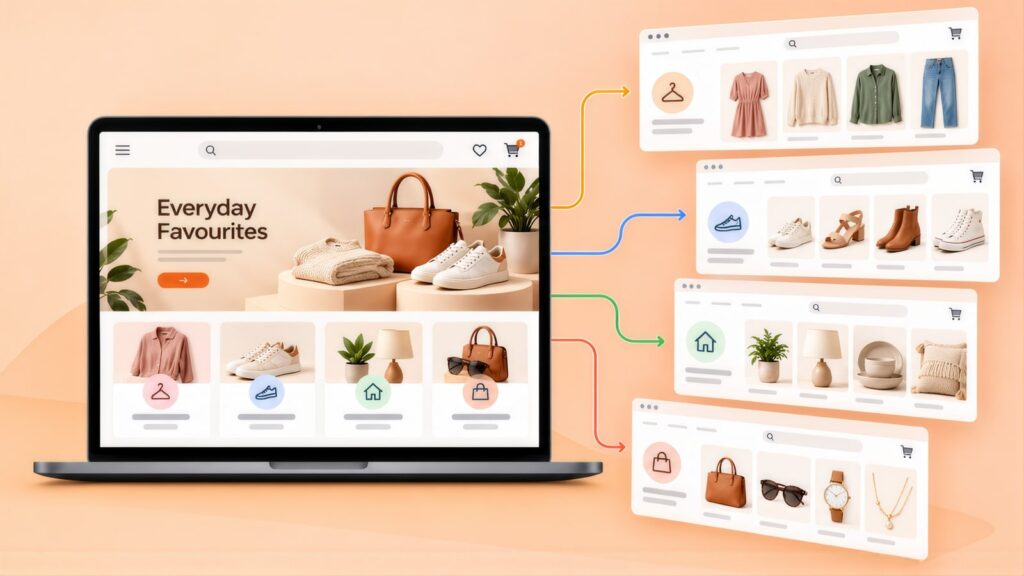
A paid click should land on the exact product or category it advertised. Price, delivery, returns and reviews should be visible straight away.
- Send product ads to the product page rather than the homepage.
- On mobile, show the free shipping threshold or delivery cost, estimated delivery date and returns terms without scrolling.
- Put the star rating and review count near the top, with review text one tap away.
- Show stock clearly (“In stock” or “Ships in [X] days”). Only allow “Add to cart” for items you can ship.
- Use at least three images per product (front, back, and detail or lifestyle), with zoom on desktop.
Product Data for Rich Results and AI Shopping
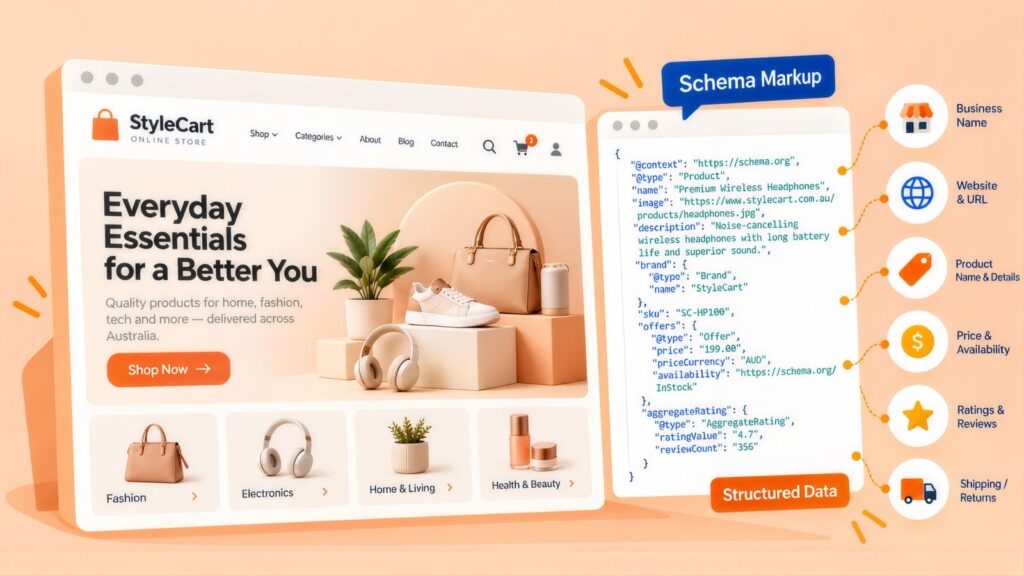
Accurate product data now feeds rich results, Google Shopping and Google’s AI shopping tools at once. Google’s Shopping Graph supplies the product information for shopping in AI Mode. Google says it holds more than 50 billion product listings, with details such as reviews, prices, colours and stock, according to its AI Mode shopping announcement.
- Make products eligible for free listings. These may show across Search, Images, Lens, YouTube, Gemini and the Shopping tab.
- Fill every relevant field: GTIN and brand, colour, size, material, an item group ID for variants and an accurate Google product category. Google’s product data specification lists wrong category, GTIN and variant values among common problems.
- Use the words shoppers search in product titles and descriptions. Keep price and stock the same on the page, in Product markup and in the feed.
- Check Merchant Center’s AI performance insights. It reports on shopping searches in AI Mode and AI Overviews, for English-language searches from Australian accounts.
AggregateRating markup on product pages with reviews can show star ratings in results. FAQ rich results work differently, as Google’s Search Central updates log shows. They were cut back to government and health sites in August 2023, then switched off on 7 May 2026. FAQPage markup on a category page can still label its questions and answers for search engines and AI tools.
Linking Categories, Products and Guides
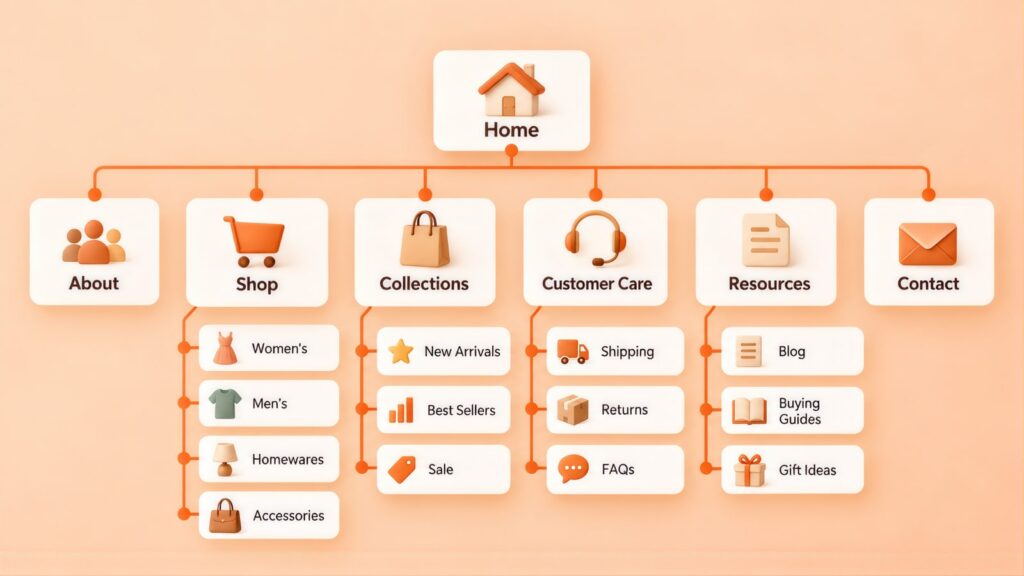
The homepage links to every major category. Categories link to sub-categories and featured products. Product pages link to related products and back to their parent category. Blog posts link to the closest category or product rather than the homepage.
| Destination | Link text examples |
|---|---|
| Category page | “shop [product category]”, “all [product type]”, “our [product type] range” |
| Shipping page | “free delivery over $[X]”, “shipping and returns”, “delivery times by state” |
| Guide from product | “caring for [material]”, “choosing the right [product]” |
Buying Guides and Link Building for Stores
Store content is worth producing when it answers a question shoppers ask before buying and links to the category that sells the answer. Good types are buying guides (how to choose the right [product]), care guides (how to clean or store it), gift guides by occasion and price, and seasonal pieces. Each should link to one category or product page.
Earning links
- Lasting guides and sizing or care charts that bloggers and journalists cite when they write about your category.
- Sending products to relevant creators, with any link or post clearly marked as sponsored.
- Broken link replacement: find dead links to products or guides like yours on relevant sites, and offer your page instead.
- Supplier and brand stockist pages that should list you as an authorised retailer.
This is the most natural kind of link building, and it sends links to the category pages that need them.
Tracking Click to Completed Purchase
Track each sale from the first click to the completed purchase, and judge the store on the five numbers below. They are only as good as your purchase data, so check that your GA4 ecommerce tracking in Google Analytics 4 records revenue, refunds and product IDs correctly.
| Metric | What to track | Why it matters |
|---|---|---|
| Add to cart rate | The share of product page visitors who add to cart | Shows whether the page and price appeal. |
| Cart abandonment rate | The share of carts that never reach a purchase | Points to checkout problems, or delivery costs and prices that put people off. |
| Conversion rate | The share of visits that end in a purchase | Shows how the site and campaigns are performing overall. |
| Net ROAS | Revenue after returns, divided by ad spend | Shows whether paid ads truly make money. |
| LTV:CAC ratio | What a customer is worth over time, divided by what it cost to win them | Sets the most you can afford to spend to win a customer. |
A Six-Month Plan for an Online Store
Month 1: feed and foundations. Check Merchant Center and fix disapproved products, starting with your best sellers. Check images against the 31 January 2027 minimum. Connect Google Search Console, submit your sitemap and test your top five category pages in PageSpeed Insights.
Month 2: category pages. Add real written content to your top three categories by revenue. Put delivery and returns details on every product page, and add Product and AggregateRating markup. If you plan to change platforms, build the redirect map now.
Month 3: Shopping. Launch or rebuild Standard Shopping with product-level tracking and a target ROAS for each margin group. Add a small brand Search campaign and review search terms weekly.
Month 4: net ROAS. Work out net ROAS after returns and fulfilment by campaign and category. Use a Google Ads account audit to find where spend leaks. Start review emails after each purchase if you are not sending them.
Month 5: content and links. Publish buying guides for your top three categories, each linking to its category page. Then start asking relevant sites to link to those guides.
Month 6: review and extend. Check in Google Search Console which categories gained organic clicks. Test Performance Max against your Standard Shopping baseline. Then extend the category work to the next tier of your range.
Ecommerce SEO and Google Ads: Questions Store Owners Ask
What is ecommerce SEO?
Ecommerce SEO is the work of getting an online store’s category and product pages to rank for the searches shoppers make. It covers keyword mapping, category and product content, technical fixes for filters, page numbering and stock, and product structured data. A good ecommerce SEO service handles all four together.
How long does ecommerce SEO take to work?
Sub-categories built around a material, size or use usually rank first, because big terms such as sofa bed are contested by large retailers and marketplaces. A platform change, or a large catalogue with crawl and duplicate-page problems, can delay results until redirects and indexing settle. In general, expect traction from about month three or four and bigger gains between months six and nine. Growth then keeps building after a year.
What does ecommerce SEO cost?
For an online store, cost grows with the size of the catalogue. It depends on how many categories need written content and how much feed and structured data work the products need. A migration or a filter clean-up adds to it. Ranges such as fashion and homewares, where large retailers already rank, take more effort. In dollar terms, an agency usually charges $1,500 to $10,000+ a month. An in-house SEO costs $80,000 to $170,000+ a year once tools and training are counted, based on this SEO cost comparison. The SEO ROI calculator shows how much extra organic revenue would cover that.
How much does Google Ads cost for an online store in Australia?
Top-of-page bids vary by product, from about $0.31 to $2.27 for sofa bed, $0.78 to $3.50 for linen sheets and $1.22 to $5.10 for skincare, from the same 1 October 2026 Keyword Planner pull as the volumes in Keyword Research Mapped to Category Pages. As an illustration, at an assumed $1.50 a click, $50 a day buys roughly 33 clicks. If 2 in every 100 clicks buy (use your own conversion rate), that is about 20 orders a month to judge net ROAS against. Google’s daily budget rules allow up to twice the daily amount on a busy day, with monthly spend capped at 30.4 times it.
Should we use Standard Shopping or Performance Max?
Most stores should start with Standard Shopping. Its reports show which products and searches produce sales, and that gives you a ROAS baseline. Test Performance Max against that baseline later, as month 6 of A Six-Month Plan for an Online Store does.
What is the 80/20 rule in ecommerce?
It is the rule of thumb that a small share of products brings in most of the revenue. Check whether it holds for your store by sorting a year of sales by product. If it does, give those products and their categories first claim on SEO work, feed fixes and Shopping budget.
How do products appear in AI Mode and AI Overviews?
Products appear through your Merchant Center product data. Google recommends meeting its free listings rules, filling in good product details and using shoppers’ search terms in titles and descriptions. Merchant Center’s AI performance insights report shows how often your products appear for shopping searches in AI Mode and AI Overviews.
Andrei Jach is Senior Manager, SEO and Analytics Specialist at Click Click Media in Sydney, with over 15 years in digital marketing and strategy. He has led SEO across retail, health, professional services and manufacturing, and oversees strategic SEO planning, analytics implementation and technical audits. He previously worked at Agent 6 Marketing and Red Propaganda.
Research led by Phillip Wendell, with Google search, advertising and keyword data first captured on 3 September 2026, and click costs refreshed on 1 October 2026. Written by Andrei Jach between 15 September and 2 October 2026, and published on 13 October 2026.
Figures are a snapshot: rankings, click prices and market conditions change.
Implement this playbook with AI
Opens your assistant with this playbook and seven questions about your business: services, area, website and ads. It then writes your keyword map, page plan and Google Ads starter build with your details filled in.
Copy the prompt for Gemini, Grok or any assistant that cannot open a prefilled link. The prompt points at this page, which is also served as Markdown to assistants that ask for it.
Work with Click Click Media
Our free audit first works out which of your categories still make money once returns, shipping and ad spend come off. It then checks your category pages, Merchant Center feed and Google Ads account, and ranks what to fix.
The Shopping campaigns we run for retailers sit within more than $115 million in Google Ads spend managed for Australian businesses since 2008. Click Click Media is a Google Premier Partner.
You can leave whenever you choose, because we use no lock-in contracts. A senior strategist manages your store’s account and takes your calls.
Verified Sources and References
- Australia Post: eCommerce Report 2026
- Australia Post: eCommerce trends from the 2026 report
- Google Merchant Center: Product data specification
- Google Merchant Center: Image link requirements
- Google Ads: About Shopping ads
- Google Ads: Create a Performance Max campaign
- Google Search Central: Pagination best practices
- Google Search Central: Managing faceted navigation
- Google Search Central: Site moves with URL changes
- Google Search Central: Localised versions of your pages (hreflang)
- Google Search Central: Product structured data
- Google Search Central: Documentation updates (FAQ rich results deprecated 7 May 2026)
- Google: Shopping in AI Mode (Shopping Graph)
- Google Merchant Center: Free listings for products
- Google Merchant Center: About AI performance insights
- Google Ads Help: About average daily budgets
- ACCC: False or misleading claims
- Click Click Media: Google Ads management (Bathroom Sales Direct result)
- Click Click Media: Blacktown Building Supplies case study
Last checked October 2026 · next review January 2027
