
SEO for Education Providers and RTOs: Google Ads and Intake Planning in Australia

Written by Andrei Jach, Senior Manager, SEO and Analytics Specialist at Click Click Media · Research led by Phillip Wendell · Published 13 October 2026
Australia has about 4,000 registered training organisations (RTOs). They serve 5.1 million VET students in a vocational training industry worth about $12.8 billion. With that many providers, SEO for education providers comes down to making each course page easy for a student to find and compare. Courses range from national qualifications in nursing and building to short skill sets in digital and business, taught face-to-face, online and in the workplace.
Students usually search with a specific course in mind. Someone looking for a Certificate IV in Accounting and Bookkeeping wants to know if you offer it, where and when, and what it costs. They also want to know if funding applies and whether they meet the entry rules. All of those answers should sit together on one clear course page.
Course searches also rise and fall with the enrolment calendar, so this guide starts there and works back. It covers what to have live and compliant before each intake, and how to plan your SEO around those peaks. It also shows how to time Google Ads for the weeks when students choose a provider.
Implement this playbook with AI
Opens your assistant with this playbook and seven questions about your business: services, area, website and ads. It then writes your keyword map, page plan and Google Ads starter build with your details filled in.
Copy the prompt for Gemini, Grok or any assistant that cannot open a prefilled link. The prompt points at this page, which is also served as Markdown to assistants that ask for it.
CCM Research: What Education Searches and Ads Showed
In CCM’s Australia-wide captures of seven education searches on 3 September 2026, provider course and offer pages were the most common page type, but they held only 16 of 68 top-ten places (23.5%).
Reading it: on the search “rto”, government websites held 5 of the top 10, led by training.gov.au, so the page type that ranks depends on the search.
Acting on it: in Google Search Console, check which of your pages already show up for your course keywords. Then build what the student needs for that course and study mode: a detailed course page, an industry overview or a pathway comparison.
Source: CCM search captures, Australia, 3 September 2026
In CCM’s analysis of Semrush ad history from September 2025 to August 2026, one advertiser on cert iv training and assessment kept the superseded code TAE40116 in its headline in all 7 months it was seen.
Reading it: the same ad’s text sold the current TAE40122. It was one advertiser among 31 across five searches, but it shows how a training package update can leave a live ad behind.
Acting on it: before each intake campaign, recheck each code on training.gov.au and update intake dates. Make sure an ad that names a qualification lands on the page for that exact qualification.
Source: CCM analysis of Semrush ad history, September 2025 to August 2026
How we ran it: on 3 September 2026 CCM captured Google’s top ten Australia-wide on desktop for seven education searches, using the DataForSEO search results API: “online courses australia”, “rto”, “corporate training programs”, “first aid course near me”, “private schools sydney”, “best online courses australia” and “what is an rto”. After removing one page that appeared twice in a single search, that gave 68 top-ten places, each sorted by hand into a page type such as course page, guide, directory or government page. For ads, CCM analysed Semrush ad history from monthly snapshots between September 2025 and August 2026 for five searches, which gave 106 ad records (one per advertiser per month) from 31 advertisers, including course directories and two marketing agencies.
The Enrolment Calendar: When Students Search for Courses
Course searches follow the enrolment calendar, with large swings between months. CCM’s analysis of Google Keyword Planner data for Australia over the 12 months to August 2026 shows this clearly:
- “certificate iii in early childhood education and care” fell to 2,400 searches in December and rose to 8,100 in July and August.
- “tafe courses” dropped to 22,200 in December, from 33,100 in most other months.
That gives each provider three things to plan:
- When your intakes fall, and how many weeks before each one students start to enquire.
- Which of your courses peak mid-year rather than in January.
- What must be fixed, written and indexed before the next peak, given that new pages take months to rank.
The rest of this playbook follows that order. Compliance and course pages come first because they take longest. Local and international reach follow, then Google Ads timed to the peaks and a calendar you can work from.
How Students Search for a Course

Students looking for training usually know the qualification they need, or are trying to work it out. They are looking for a provider that offers it in the right format and place, at a cost they can manage. Good SEO starts with course pages that answer all of that in one place, and specialist SEO services can build those pages at scale.
An RTO can issue national qualifications and Statements of Attainment under the Australian Qualifications Framework. A training business that is not an RTO cannot use this language. Do not call yourself an RTO, or suggest your training leads to a recognised qualification, unless you are registered with ASQA or your state training authority. Using nationally recognised or qualification-framework terms without that registration is a serious misrepresentation under the Australian Consumer Law. The ACCC’s guidance on misleading claims applies. Registered providers must also show their RTO number, as set out in Course Page and RTO Code Basics below.
Course listing and comparison sites
Course search sites can compete with you for the same searches. The government’s old My Skills site became part of Your Career in July 2023, and students can search and compare VET courses and providers there. Course Seeker does the same for undergraduate degrees, run by the Australian Government and the tertiary admission centres. Private sites such as training.com.au also list courses from many providers.
Check that your listings on these sites match your current codes and fees. Your own course page can then give more detail than a listing that covers many providers. It can show the exact qualification, campus, study mode, fees and next intake.
RTO Obligations and Advertising Compliance
ASQA’s information and transparency practice guide sets out what your marketing must include. It also lists the mistakes ASQA sees most, such as promoting superseded courses. The table below sets out the main rules.
| Rule | What it means | How to meet it |
|---|---|---|
| Show your RTO number | All marketing for national training must show your RTO number. Course Page and RTO Code Basics covers this rule in full. | Put “RTO [number]” on each course page, in each Google Ad for national training and in your site footer. |
| No job or qualification guarantees | You cannot guarantee a job, or guarantee that a student will gain a qualification. Saying “our graduates get jobs” is fine if you can prove it, but a promise such as You’ll have a job within 90 days breaks the rule. | Use real job outcome data you can back up, where you have it. Give the year, how the survey was run and the response rate, and avoid open-ended promises. |
| Funding conditions | Subsidised training (Smart and Skilled, Free TAFE, Skills for Education and Employment and others) has eligibility rules that change with funding agreements. You cannot enrol every student at a subsidised rate. | State the eligibility rules on each page that mentions subsidised training. “Government funding available for eligible students”, with a link to the rules, is compliant, while “Government funded training” with no conditions is not. |
| Current qualification codes | Training package updates change qualification codes. An ad for an old code confuses students and creates risk under the Australian Consumer Law. | Check training.gov.au for the current code before you publish any course page or ad. Update codes when new training packages come out. |
| CRICOS for international students | To enrol students on a student visa, you must be registered on CRICOS, the Commonwealth Register of Institutions and Courses for Overseas Students. | Show your CRICOS registration on pages aimed at international students. Do not enrol student visa holders without it. |
Common mistakes to avoid
- An ad or page that still names a superseded qualification code.
- A course page or ad with no RTO number.
- “Free” or “funded” training with no eligibility conditions.
- Job or qualification promises you cannot back up.
- Ads that land on the homepage instead of the course page.
- Full ad budgets running through the December lull.
Course Page and RTO Code Basics

A complete course page
A complete course page answers a student’s questions without them having to ring or email first. It covers:
- The qualification name, including its full code from training.gov.au.
- The units it covers and who it is for.
- The entry requirements.
- How and where it is taught, and how long it takes.
- The fees and how payment works.
- Who is eligible for funding, with the conditions stated accurately.
- How a student applies.
The RTO number rule in full
The 2025 Standards for RTOs replaced the 2015 Standards on 1 July 2025. Under them, your advertising and marketing must include your RTO registration code or a link to your National Register listing. That covers your website, Google Ads, social media and any other ads for national training. In practice, put your RTO number on each course page, in each ad and in the site footer. Other sections of this guide refer back to this rule. NDIS providers have a comparable duty under a regulator with its own advertising rules, and SEO for NDIS providers must follow the Commission rules.
SEO for Education Providers: Course Keyword Clusters
Students search by qualification, job, study mode, funding, RPL and employer need. Full qualification names get real search volume. “certificate iii in individual support” averages 18,100 searches a month and “certificate iv in training and assessment” averages 14,800 (CCM analysis of Google Keyword Planner data, Australia, 12 months to August 2026).
Qualification Level
Certificate III [trade/profession]
Certificate IV [field]
Diploma of [subject]
Advanced Diploma [field]
Industry/Occupation
aged care course Australia
childcare qualification [state]
nursing certificate
construction course [city]
Delivery Mode
online [qualification]
[qualification] online Australia
self-paced [course]
face-to-face [qualification] [city]
Funding and Subsidies
free TAFE [state]
government-funded training [state]
Fee-Free TAFE [qualification]
[course] fee concession
RPL and Pathways
RPL [qualification]
recognition of prior learning
credit transfer [qualification]
pathway to [career]
Employer/Industry
workplace training [industry]
staff training [qualification]
industry upskilling
professional development [field]
The Course and Career Pages an RTO Site Needs

An RTO site needs career pages that group courses, and a page for each qualification. Add separate online course pages where online study works differently. You also need a funding page and an about page that shows your registration.
| Page | Focus keyword | What to include |
|---|---|---|
| Industry or career pages | [career] training or [industry] qualification | Career paths in the industry, the qualifications needed and how to progress, with a link to each qualification page. |
| Course pages | [qualification code] [qualification name] | Full qualification name and code, units, entry rules, study mode and timetable, fees, funding with conditions, how to apply and FAQPage schema. |
| Online course pages | [qualification] online Australia or online [course type] | How online study works, how long it takes, the support you give, what technology students need and who online study suits. |
| Funding page | government funded training or free TAFE | Which programs you take part in, who is eligible for each, how to apply for a funded place and what happens if a student is not eligible. |
| About page | [RTO name] or RTO [number] | Your RTO number, ASQA registration status, years in operation, CRICOS registration if relevant and team credentials. |
Title Tags and Meta Descriptions for Course Pages
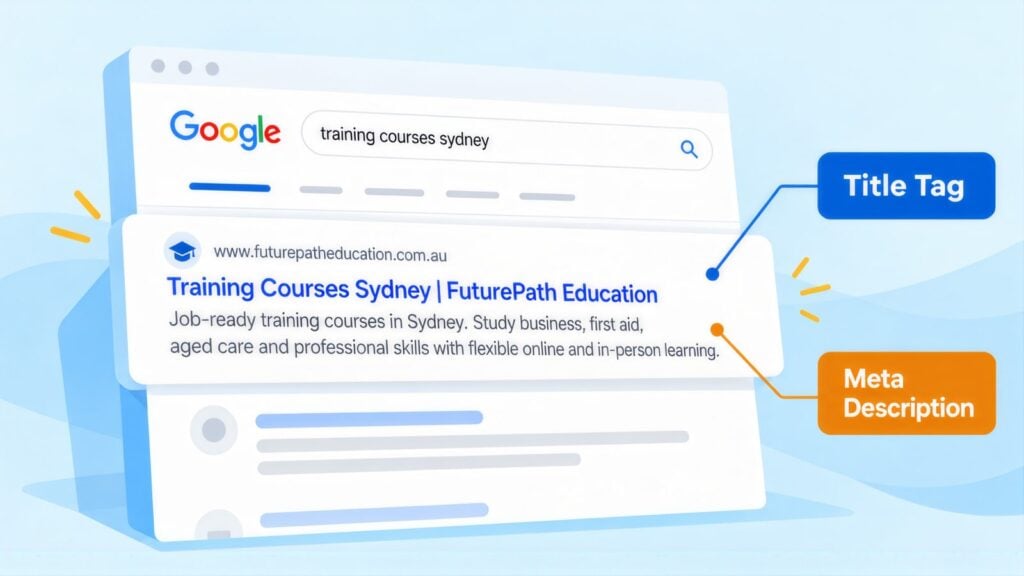
Start course titles with the full qualification name, then add your RTO number or study mode. Students search for the qualification first and the provider second.
| Page | Example title tag | Characters |
|---|---|---|
| Qualification page | Certificate IV in [Field] Online | RTO [N] | 42 |
| Online course | [Qualification] Online | Enrol for [Month] | 42 |
| Funding page | Government Funded Training [State] | Eligibility | 48 |
| Industry career page | Aged Care Courses [State] | Career Pathways | 43 |
Leave your provider name off unless the finished title is still 55 characters or under, which rules out most long legal names. Google usually displays your site name with the listing, so cut the brand before any part of the qualification name. A meta planner template keeps the code, RTO number and character count for each course page in one sheet.
Compliant meta description example
This one runs to 148 characters with the placeholders typed out: “Certificate IV in [Field] ([code]) online or on campus in . Fees, entry requirements and funding eligibility listed. Enrol with RTO [number].” It leads with the qualification and code, carries the RTO number and makes no funding promise the page cannot back up.
Course Schema and Structured Data
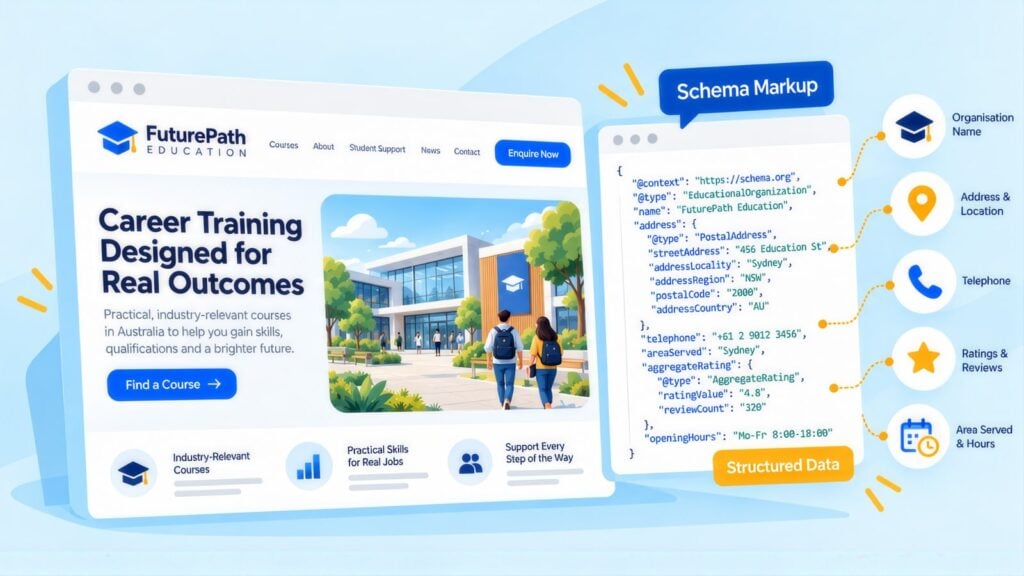
Course schema is structured data on each qualification page. It tells search engines and AI tools exactly what you teach, who provides it and what students need first.
| Schema type | Where to use it |
|---|---|
| Course | Each course or qualification page. Include the name, description, provider and prerequisites. |
| EducationalOrganization (LocalBusiness) | Your homepage and about page. |
| FAQPage | Course pages with questions about entry, fees and study mode. |
| BreadcrumbList | All inner pages of the site. |
Course schema with the right codes and prerequisites also helps AI answers describe your courses correctly, which is part of building AI search visibility.
Course FAQs will not show as drop-down answers in Google. Private RTOs lost that display in August 2023, when Google kept it for government and health sites only. The Search Central updates log notes it was removed from all sites on 7 May 2026. FAQPage markup on entry, fee and study mode questions still helps search engines and AI tools match each question to its answer.
How to Link Courses, Funding and Applications
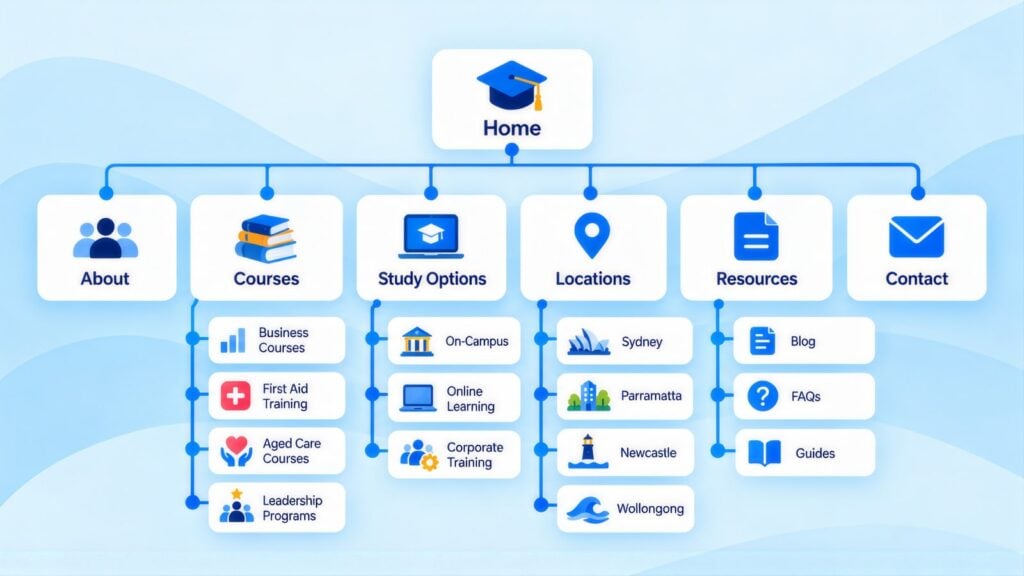
Group courses under industry pages, then link each course to its funding page and application form. A clear site structure like this helps students and search engines find each course, and this article on planning information architecture explains how to map it out.
- Qualification pages: “Certificate IV in [Field]”, “[qualification] in “.
- Funding page: “check funding eligibility”, “ funded training”.
- Application form: “apply for the next intake”, “start your enrolment”.
An aged care career page, for example, would link “Certificate III in Individual Support” to the qualification page and “check funding eligibility” to the funding page. It would end with “apply for the next intake” next to the published start date.
Career Guides to Publish Before Each Intake
Many students start with a career question rather than a course name. Guides that answer “how do I become…” or “which qualification do I need” reach them early and lead them to your course pages.
Publish these two or three months before the intake they feed, so Google has indexed them when searches climb. Four kinds work well:
- Career guides: how to become an aged care worker in Australia, what qualifications electricians need in , and the path from Certificate III to Diploma.
- Funding guides: how Smart and Skilled works in NSW, who qualifies for Free TAFE in Victoria and what Fee-Free TAFE covers.
- Study mode guides: self-paced or structured online study, what a traineeship involves and how workplace hours count towards a qualification.
- RPL guides: how Recognition of Prior Learning works, what evidence an assessment needs and how RPL differs from credit transfer.
Local SEO for Campuses and Training Centres

Face-to-face and blended providers enrol many students who want training nearby, which makes local search visibility important for each campus. Online providers may care more about national rankings than the map results, although a Google Business Profile still shows students that you are a genuine provider.
Set up each campus profile in this order. Choose Vocational school, Training centre or the most specific accurate primary category for how you mainly teach. Then list your qualifications and skill sets by industry and level as services, which helps Google match the campus to searches for specific courses. Put your RTO number in the business description (see Course Page and RTO Code Basics above). Once students finish, ask them for a review, and make sure any review you quote about job outcomes can be backed up and does not read as a banned guarantee.
Providers with several sites need one profile and one location page for each campus. Each needs its own courses, timetable and contact details, so a student searching near one campus sees the right intake dates.
International Students: CRICOS, ESOS and Education Agents
Only institutions registered under the ESOS Act and listed on CRICOS can enrol overseas students on a student visa. The CRICOS course code is a separate number from the national training code. If you recruit overseas, the marketing rules come from the National Code of Practice 2018 as well as ASQA. Standard 1 covers marketing information and practices, and Standard 4 covers education agents.
In practice, that shapes your site in three ways:
- International course pages show the CRICOS provider and course codes next to the RTO number.
- Intake dates follow the student visa timeline, so international peaks can come months before domestic ones.
- If students come through agents, give agents their own page with current codes, fees and entry rules, so they do not copy old details into their own listings.
If you publish pages in other languages, give each one its own URL and keep the codes and fees the same as on the English page.
Google Ads for RTOs, Timed to Each Intake
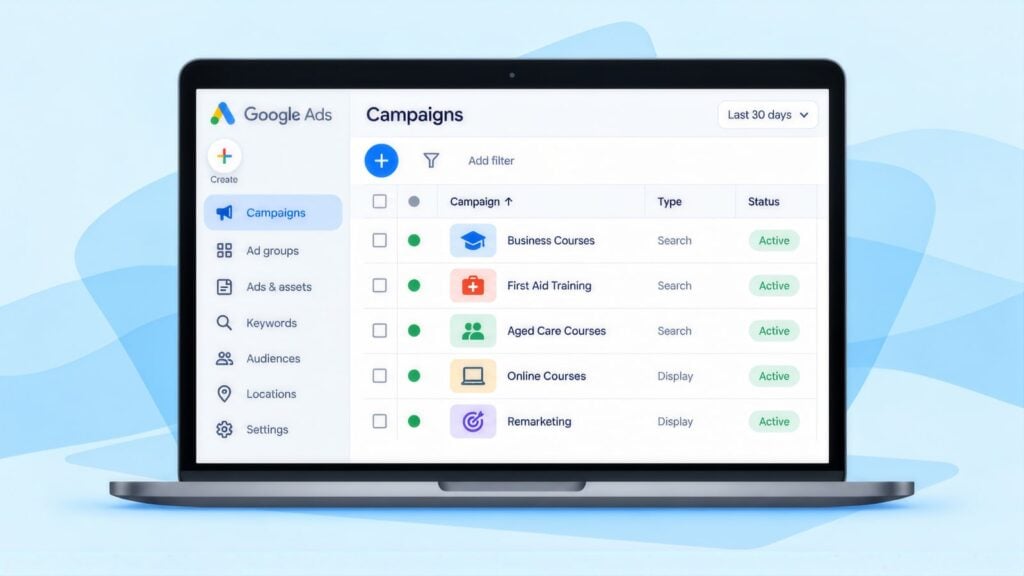
The settings below suit most providers starting out with Google Ads. Tighten them once you know which groups of qualifications enrol best. Expert Google Ads management can take this on if your team is stretched.
| Setting for an RTO account | Starting point |
|---|---|
| Campaigns | Run a Search campaign for each industry or group of qualifications. That keeps keywords tightly grouped and lets you move budget to the courses that pay best. |
| Location targeting | For face-to-face courses, show ads to people in or often in commuting distance of your campuses. For online courses, target all of Australia. Adjust bids by state if funding differs by state. |
| Ad schedule | Run ads in business hours, when your enrolment team can reply. A student who asks about an intake on a Tuesday morning needs an answer that day. |
| Bidding | Start on manual CPC, which stands for cost per click and lets you choose the highest amount you will pay. Click prices vary by course; the FAQ below lists ranges for four course terms. Learn how many enquiries turn into students before you set a target cost per enrolment. |
As an example of what a starting budget buys, Keyword Planner puts top-of-page bids for “certificate iii in individual support” at $2.09 to $7.55 a click. The table shows what $1,000 a month gets you:
| You spend | Cost per click | You get |
|---|---|---|
| $1,000 | $7.55 (top of the range) | About 130 clicks |
| $1,000 | $2.09 (bottom of the range) | About 480 clicks |
Run one qualification group at that level for a month, then judge it on eligible applications rather than clicks.
Set budgets by the calendar in The Enrolment Calendar: When Students Search for Courses above, raising them in the weeks before each intake. Scale back over the December lull so you are not paying for clicks from students who will not start until next year.
LiteracyPlanet is an online literacy platform, so it is an education software business rather than an RTO. CCM rebuilt its Google Ads campaigns around services instead of places. In February 2026, compared with the year before:
- clicks reached 16.3K, up 98.8%
- conversions reached 256, up 20.4%
- the average cost per click fell 50.4% to $0.13
- total spend fell 1.3%.
Its click prices come from literacy searches, so they are no guide to the course click prices in the FAQ. The LiteracyPlanet case study covers the full restructure.
Keywords, Negatives, and Ad Copy
Bid on qualification, study mode and state searches. Block job, university and apprenticeship-job searches with negative keywords, which stop your ad showing for those words. Each ad for national training carries your RTO number (see Course Page and RTO Code Basics above).
| Bid on | Add as negative keywords |
|---|---|
| “[qualification] “, “[course type] online Australia”, “[industry] certificate “, “RTO [qualification]” | jobs (in the field, not training), university degree, bachelor, master, doctoral, apprenticeship jobs (if you are not an apprenticeship RTO), government jobs |
Check the search terms report each week, since it lists the actual searches your ads appeared for. A Google Ads audit checklist helps you catch job seekers and university searches that slip past your negatives.
Compliant RTO ad copy
| Component | Example |
|---|---|
| Headline 1 | Certificate IV [Field] |
| Headline 2 | Delivered by RTO [N] |
| Headline 3 | Online & Face-to-Face |
| Headline 4 | Next Intake [Month] |
| Description | Nationally recognised [code], online or in [city]. Funding for eligible students. |
Landing Pages and Course Pages That Convert

Paid clicks turn into enquiries best on dedicated course landing pages. Each one should carry everything below:
- The full qualification name and current code from training.gov.au, in the page heading.
- Entry requirements, including any minimum age, literacy level or prerequisite.
- Fees, with funding eligibility stated accurately. Show the full fee and any subsidised fee, with the conditions for the lower rate.
- Study mode, location and timetable: whether it is online, face-to-face or blended, when the intakes are and how long it takes.
- An application or enquiry form on the page, so students who search online do not have to phone to start enrolling.
- Your RTO number, as Course Page and RTO Code Basics above requires.
Conversion Tracking: Enquiry to Commenced Student
Measure success by students who actually start. Record each stage below against its source. Most providers need Google Analytics 4 (GA4) tracking on the enquiry form, plus a field in their CRM (the system that holds student records) for what happens next.
| Stage | What to record |
|---|---|
| Enquiry received | The qualification, study mode, state, funding interest, source and date. |
| Eligible application submitted | Whether they meet the entry rules, and whether funding eligibility is confirmed. |
| Offer accepted and enrolment confirmed | The qualification, study mode, funding type and source. |
| Student starts | The date they began their first unit, and the source. |
| Student completes | The qualification or skill set awarded, and completion rates by source and intake. |
If you offer funded places, count eligible applications apart from total enquiries before you change anything. Compare these two made-up campaigns, which assume different funding eligibility rates:
| Campaign | Enquiries a month | Share eligible for funding | Subsidised enrolments |
|---|---|---|---|
| Campaign A | 200 | 10% | 20 |
| Campaign B | 100 | 40% | 40 |
Campaign B brings half the enquiries but twice the enrolments. Judge campaigns on the eligible application rate rather than the enquiry count.
An Intake Calendar for a Training Provider
Map the work to your own intake dates. The calendar below assumes a main intake at the start of the year and a second one mid-year, which matches the national search pattern. Shift the rows if your intakes run on a different cycle.
| Intake period | What searches do | What to do |
|---|---|---|
| Three or more months before the next intake | Steady, ahead of the peak. | Check each course code against training.gov.au and confirm the RTO number is on each course page. Review funding claims and remove any job or qualification guarantees. Rewrite your top three course pages and add Course schema. Then set up Google Search Console, Google’s free report on how your pages perform in search; this walkthrough on setting up Google Search Console covers each step. |
| December | The lowest point of the year for most course searches. | Scale ad budgets back and publish career, funding and RPL guides so Google indexes them by January. Update intake dates for the new year. |
| January to February (start-of-year intake) | Back to normal or peak levels. | Run Google Ads at full budget for the qualification groups with places left, with the RTO number in the copy. Check search terms each week and answer enquiries the same day. |
| March to May | Settle after the first intake. | Work out the cost per eligible application and per student who starts, by qualification group and study mode. Check which course pages bring organic enquiries, then build the next course category. |
| June to August (mid-year intake) | Peak for some courses, such as early childhood education and care. | Raise budgets for the mid-year courses. Refresh codes and dates before those campaigns restart. |
Education SEO and Google Ads: Common Questions
What is SEO for education providers?
SEO for education providers is the work that gets your course pages found when students search for a qualification, a career or a funded place. For RTOs, it means one complete page for each qualification and current codes from training.gov.au. It also means accurate funding wording and your RTO number on each course page.
How long does SEO take for a training provider?
The enrolment calendar determines when results matter most, so start at least one intake ahead. Pages rewritten in October are better placed for a mid-year peak than for January. An older provider domain moves faster than a new one. A long course list or several campuses take longer to cover. If you follow the stages in the cost comparison linked in the next answer, expect early ranking movement in 3 to 4 months. Course enquiries should be stronger in 6 to 9 months, and growth carries on past the first year.
How much does SEO cost for an RTO or college?
For a training provider, the size of the course list drives the cost. Each qualification needs its own page with a current code, units, entry rules and funding wording. Every page also has to be checked against the 2025 Standards for RTOs, and each campus or overseas market adds more. Agency fees run from $1,500 to $10,000+ a month, and an in-house hire costs $80,000 to $170,000+ a year once tools and training are added. Those ranges come from this agency and in-house SEO cost comparison. An RTO with one campus and a few qualifications usually sits near the bottom. To weigh the fee against what a new student is worth, try an SEO ROI calculator.
Can we do SEO for our RTO ourselves?
You can do part of it yourselves. Your own team is best placed to keep course codes, intake dates, fees and funding wording current, which is where most course pages fall down. Technical fixes, Course schema, keyword research and link building usually need specialist time, so many providers share the work with an agency.
What do Google Ads clicks cost for course searches?
Most course clicks cost between about $1 and $15 at national top-of-page bids. Google Keyword Planner shows “tafe courses” at $0.60 to $3.00 and “certificate iv in training and assessment” at $1.52 to $4.98. It shows “certificate iii in individual support” at $2.09 to $7.55 and “certificate iv in accounting and bookkeeping” at $3.97 to $14.18 (CCM analysis of Google Keyword Planner data, Australia, 12 months to August 2026). At those prices, $1,000 buys roughly 130 to 480 clicks for a Certificate III in Individual Support campaign.
Can we rank above course comparison sites?
You can compete with them on specific searches. Your course page can give more detail than a listing that covers many providers: the exact code, campus, fees, study mode, funding conditions and next intake. Keep your own listings on Your Career and similar sites accurate too, since they can send students your way.
When should training providers run Google Ads?
Run them before and during your intake peaks. National search data shows course searches dip in December and recover in January, and early childhood courses peak mid-year. Match budgets to your own intake dates, and keep ads pointed at courses with places left.
Do Google Ads for nationally recognised training need the RTO code?
Yes. Under the 2025 Standards for RTOs, marketing for national training must include your RTO code or a link to your National Register listing. Put “RTO [number]” in your ad copy or assets, and on the landing page.
Andrei Jach is Senior Manager, SEO and Analytics Specialist at Click Click Media in Sydney, with over 15 years in digital marketing and strategy. He has led SEO across professional services, health, retail and manufacturing, and oversees strategic SEO planning, analytics implementation and technical audits for CCM clients. He previously worked in digital strategy at Agent 6 Marketing and Red Propaganda.
Research led by Phillip Wendell, with Google search, advertising and keyword data first captured on 3 September 2026. Written by Andrei Jach between 15 September and 2 October 2026, and published on 13 October 2026.
Figures are a snapshot: rankings, click prices and market conditions change.
Implement this playbook with AI
Opens your assistant with this playbook and seven questions about your business: services, area, website and ads. It then writes your keyword map, page plan and Google Ads starter build with your details filled in.
Copy the prompt for Gemini, Grok or any assistant that cannot open a prefilled link. The prompt points at this page, which is also served as Markdown to assistants that ask for it.
Work with Click Click Media
Our free audit starts from your intake dates. We review your website, Google Ads account and Business Profile. We check course codes, RTO number display and funding wording against the 2025 Standards for RTOs and ASQA’s marketing guidance. Then we list what needs fixing before your next enrolment peak. There is no obligation to continue.
Click Click Media has run search marketing for Australian businesses since 2008. We hold Google Premier Partner status and have managed over $115 million in Google Ads spend. Each training provider gets a senior strategist who plans campaigns around its own enrolment calendar. Our agreements carry no lock-in contract.
Verified Sources and References
- ASQA: Standards for RTOs (2025 Standards)
- ASQA: Practice guide, information and transparency
- ASQA: About providers
- NCVER: Total VET students and courses 2025
- IBISWorld: Technical and Vocational Education and Training in Australia
- CRICOS: Commonwealth Register of Institutions and Courses for Overseas Students
- Department of Education: National Code of Practice 2018
- Click Click Media: SEO cost, agency vs in-house
- Training.gov.au: National Register of VET qualifications
- DEWR: My Skills is now part of Your Career (July 2023)
- Course Seeker: Australian Government and tertiary admission centres undergraduate course search
- Google Search Central: Documentation updates (FAQ rich result removed, May 2026)
- Google Search Central Blog: Changes to HowTo and FAQ rich results (August 2023)
- ACCC: False or misleading claims
- Click Click Media: SEO services
- Click Click Media: Google Ads management
Last checked October 2026 · next review January 2027
